Wednesday, March 11, 2015
Google Spreadsheets and Forms send new records via email
1. You create a form to collect data (event sign-in form).
2. To make it simple for everyone, you create it in Google docs (so you can set who has access - from anywhere; simple download,... hey its just collecting data, right?)
3. Theres a person in the team that uses Excel and Excel only. And email.
4. So this person wants to get on email each new record that is added to that spreadheet.
5. You send link. But he doesnt want that. He wants each new record on email. Data, not link.
So what do you do? Google for solutions. But wait, almost every solution is about "set notification rules" on document. Thats cool. But you get only link via email.
Well, I did some further research and came quite close to solution:
http://www.labnol.org/software/mail-merge-with-gmail/13289/
So, if I can send email to everyone, why not send it just to 1 person? Well, as it turns out, it works. Ive just modified the script a little bit. :-)
First, go to Script Editor on your spreadsheet.
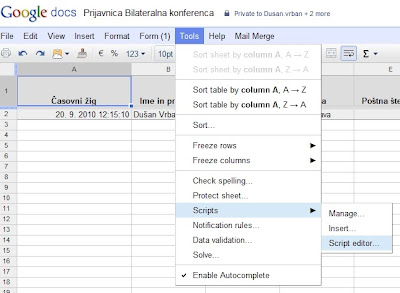
Then, copy and modify bellow script in.
function onFormSubmit (){
sendEmail();
}
function sendEmail() {
var mySheet = SpreadsheetApp.getActiveSpreadsheet().getActiveSheet();
var LastRow = mySheet.getLastRow();
var emailYourName = "My name";
var emailReplyTo = "my.email@OurDomain.com";
var emailTo = "thePerson@theDomain.org";
var emailSubject = "Your data. Pointless. But here you have it.";
//variables: sure, you can have your own, logic is obvious. :-)
var CasPrijave = mySheet.getDataRange().getCell(LastRow, 1).getValue();
var ImeInPriimek = mySheet.getDataRange().getCell(LastRow, 2).getValue();
var Organizacija = mySheet.getDataRange().getCell(LastRow, 3).getValue();
var Ulica = mySheet.getDataRange().getCell(LastRow, 4).getValue();
var Postna = mySheet.getDataRange().getCell(LastRow, 5).getValue();
var Kraj = mySheet.getDataRange().getCell(LastRow, 6).getValue();
var Telefon = mySheet.getDataRange().getCell(LastRow, 7).getValue();
var Email = mySheet.getDataRange().getCell(LastRow, 8).getValue();
var Soglasje = mySheet.getDataRange().getCell(LastRow, 9).getValue();
var Jezik = mySheet.getDataRange().getCell(LastRow, 10).getValue();
//Email: bla, bla and variables.
var emailBody = "Bla, bla... Data:
";
emailBody += "Čas prijave: " + CasPrijave + "
";
emailBody += "Ime in priimek: " + ImeInPriimek + "
";
emailBody += "Organizacija: " + Organizacija + "
";
emailBody += "Ulica: " + Ulica + "
";
emailBody += "Poštna številka: " + Postna + "
";
emailBody += "Kraj: " + Kraj + "
";
emailBody += "Telefon: " + Telefon + "
";
emailBody += "Email: " + Email + "
";
emailBody += "Soglasje: " + Soglasje + "
";
emailBody += "Jezik: " + Jezik + "
";
//SendEmail
var advancedArgs = {htmlBody:emailBody, name:emailYourName, replyTo:emailReplyTo};
MailApp.sendEmail(emailTo, emailSubject, emailBody, advancedArgs);
//Interesting, it needs to flush. Sure, pointless work that had to be done.
SpreadsheetApp.flush();
}
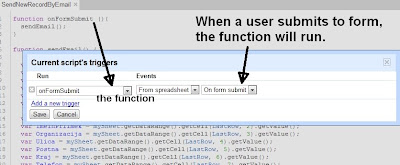
In the end, dont forget to set triggers (onFormSubmit)

Monday, March 9, 2015
New Google Apps Marketplace YouTube channel full of vendor videos
Heres a playlist of the videos, but you should visit the channel for the full experience:
If you havent already launched an app on the Marketplace, visit developer.googleapps.com to learn how to integrate with Google Apps. After youve published your app on the Marketplace, let us know if youve created a great video that showcases the app and its capabilities and we may feature it on the new YouTube channel.
Saturday, February 28, 2015
e Learning in Malaysia My New Blog
- Link to My New Blog

I just want to share with those that read this blog (or bump into it!) that I have started a new blog today (January 9th, 2008) entitled e-Learning in Malaysia. It is kind of empty right now (except for a few interesting links and posts), but as I learn over the coming months (and perhaps years), I believe it will evolve into a useful blog to find e-learning related things going on in Malaysia.
I hope this blog will eventually evolve into a good starting point to discover e-learning things going on in Malaysia (that is accessible to the public). My new learning adventure (in addition to ZaidLearn) will try to mash-up the juiciest e-learning stories going on in Malaysia (past, present, future), including:
- Higher Education (Universities & Colleges)
- Schools (Primary & Secondary)
- Corporate Learning
- Communities
- Projects
- Solution Providers
- Research Papers & Articles
- People
- Conferences
- Blogs
- Etc.
In short, the main goal for setting up this blog, is to discover, learn, share, discuss, network, and reflect about e-learning in Malaysia. Click here to read the full story behind this blog.
ZAIDLEARN?
It will continue, too (speed posting the learning juice!)!
ZaidLearn will continue to explore the world of FREE learning tools and resources, while e-Learning in Malaysia will ZOOM in on e-learning adventures going on in Malaysia.