Thursday, March 12, 2015
Iterative Development and User Story Slicing
Here is a quick discussion on Iterative vs Incremental development:

- Allows you to validate your architecture and solution early
- Allows users to see and test the whole application early
- Minimizes the affects of change to a feature
- Ensures important stories are built first
- Elicits improved feedback on the whole application early
- Allows you to deliver your application early
- Discourages "gold plating"
- It partners nicely with user story mapping (turn the diagram upside down and you have your story map)
- Your code and design has to be change tolerant
- You have to be proficient at slicing your user stories
- You wont know the final solution at the beginning of the project
The first story slice is simply a form with little or no validation with text boxes To, Subject and Body with Send and Cancel buttons. When the user fills in the text boxes and clicks Send an e-mail is sent provided the e-mail addresses entered are correct. But, this e-mail has no extra features like support for HTML formats, RTF, attachments, e-mail priorities, etc. Once this story is implemented, the team will implement similar slices of each feature for Read Email, Create Appointment, View Calendar, Create Task, Edit Task, Create Contact, Edit Contact, etc in order to create a minimalist working model of the whole application.
 |  |
The next slices of this particular feature would be to implement stories such as implementing Carbon Copy (CC) and taking e-mail addresses from your contact list. You can also see that the form has changed slightly - the Cancel button has been removed and the Send button has been moved to the top.
 |  |
As we continue to iterate through this feature by adding story slices, the form takes additional shape, adding tool bars and tool bar items. At this point, the application may be finished enough to release to production and start earning revenue for the organization while we continue to add new features and use that revenue to help fund the remainder of the project.
 |  |
A further release with more story slices implemented:
 |  |
The final release:
 |  |
Iterative development is an important tool in your agile toolbox to help your teams deliver early and adapt to change while keeping the projects end goals in mind. User story slicing is one of the important techniques you can use to help make this happen.
Want to receive future blog posts in your inbox? Enter your email address here.

Wednesday, March 11, 2015
Google Spreadsheets and Forms send new records via email
1. You create a form to collect data (event sign-in form).
2. To make it simple for everyone, you create it in Google docs (so you can set who has access - from anywhere; simple download,... hey its just collecting data, right?)
3. Theres a person in the team that uses Excel and Excel only. And email.
4. So this person wants to get on email each new record that is added to that spreadheet.
5. You send link. But he doesnt want that. He wants each new record on email. Data, not link.
So what do you do? Google for solutions. But wait, almost every solution is about "set notification rules" on document. Thats cool. But you get only link via email.
Well, I did some further research and came quite close to solution:
http://www.labnol.org/software/mail-merge-with-gmail/13289/
So, if I can send email to everyone, why not send it just to 1 person? Well, as it turns out, it works. Ive just modified the script a little bit. :-)
First, go to Script Editor on your spreadsheet.
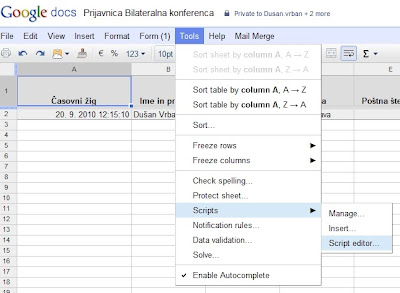
Then, copy and modify bellow script in.
function onFormSubmit (){
sendEmail();
}
function sendEmail() {
var mySheet = SpreadsheetApp.getActiveSpreadsheet().getActiveSheet();
var LastRow = mySheet.getLastRow();
var emailYourName = "My name";
var emailReplyTo = "my.email@OurDomain.com";
var emailTo = "thePerson@theDomain.org";
var emailSubject = "Your data. Pointless. But here you have it.";
//variables: sure, you can have your own, logic is obvious. :-)
var CasPrijave = mySheet.getDataRange().getCell(LastRow, 1).getValue();
var ImeInPriimek = mySheet.getDataRange().getCell(LastRow, 2).getValue();
var Organizacija = mySheet.getDataRange().getCell(LastRow, 3).getValue();
var Ulica = mySheet.getDataRange().getCell(LastRow, 4).getValue();
var Postna = mySheet.getDataRange().getCell(LastRow, 5).getValue();
var Kraj = mySheet.getDataRange().getCell(LastRow, 6).getValue();
var Telefon = mySheet.getDataRange().getCell(LastRow, 7).getValue();
var Email = mySheet.getDataRange().getCell(LastRow, 8).getValue();
var Soglasje = mySheet.getDataRange().getCell(LastRow, 9).getValue();
var Jezik = mySheet.getDataRange().getCell(LastRow, 10).getValue();
//Email: bla, bla and variables.
var emailBody = "Bla, bla... Data:
";
emailBody += "Čas prijave: " + CasPrijave + "
";
emailBody += "Ime in priimek: " + ImeInPriimek + "
";
emailBody += "Organizacija: " + Organizacija + "
";
emailBody += "Ulica: " + Ulica + "
";
emailBody += "Poštna številka: " + Postna + "
";
emailBody += "Kraj: " + Kraj + "
";
emailBody += "Telefon: " + Telefon + "
";
emailBody += "Email: " + Email + "
";
emailBody += "Soglasje: " + Soglasje + "
";
emailBody += "Jezik: " + Jezik + "
";
//SendEmail
var advancedArgs = {htmlBody:emailBody, name:emailYourName, replyTo:emailReplyTo};
MailApp.sendEmail(emailTo, emailSubject, emailBody, advancedArgs);
//Interesting, it needs to flush. Sure, pointless work that had to be done.
SpreadsheetApp.flush();
}
In the end, dont forget to set triggers (onFormSubmit)
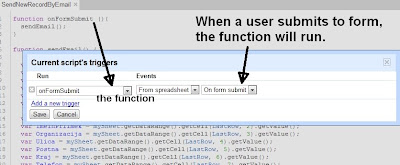
Monday, March 9, 2015
Monitor user logins storage consumption and apps usage with the Admin SDK
Security is a top priority for Google, just as it is for many of our Google Apps customers. As a domain administrator, a big part of keeping your users safe is knowing when and how they are using their accounts. Since we launched the Admin SDK Reports API in June, weve continued to add features to let you more easily visualize Google Apps usage and security in your domain. These new features include:
Security Reports
- Login audit—View all web browser based logins with IP information for all users in your domain. You can use this data to monitor all successful, failed, and suspicious logins in your domain.
- Authorized applications—View a list of third-party applications that users in your domain have shared data with. Gain visibility into how many users are accessing each application. Revoke access to specific apps using the security tab on Admin console.
Usage Reports
- Storage quota—View user-level quota usage. This is available both as total usage and split by Gmail, Drive and Google+ photos for every user in the domain. Monitor which users are nearing their quota limits and acquire more storage if necessary.
- Google+ usage—View 1-day, 7-day and 30-day active Google+ usage in your domain. See the number of Hangouts attended by users in your domain.
Refer to the Reports API documentation for more details on how to use the Reports API and to see what is possible with all of our entire Admin SDK.
 | Rishi Dhand profile Rishi Dhand is a Product Manager on the Google Apps for Business team. In addition to working on data migration features, he also works on the Google Apps administration platform with focus on building new security and admin reporting features. In his free time, he enjoys playing squash and badminton. |
Tuesday, March 3, 2015
Using Twitter to Amplify Connective Learning and Sharing at ICEL 2010

- Ludwig Wittgenstein
#ICEL5

Besides this, I would like to highlight that if you are an active Twitter user, Monitter might not be the ideal tool to monitor/track a word, phrase or hashtag (e.g. #icel5). Instead, you might as well use the Search function in Twitter, and then save the search, which you can follow.
Another tool you might want to consider (among several) is TweetDeck, which provides you a host of excellent features to track whatever you want, and also enables conveniently to update your own Twitter world. If you are using an IPhone, you are probably going to love the TweetDeck application.
Alright, so did the #icel5 learning stream idea work?
THANK YOU!
But, before going into that, I would like to thank everyone involved with the 5th International Conference on e-Learning (ICEL 2010) for making it a sizzling learning adventure (Universiti Sains Malaysia, Penang, Malaysia 12-13 July 2010).
Also, I would like to give a special thanks to Prof. Rozhan M. Idrus (Conference Chair) for inviting me personally, and making it a memorable and exciting learning adventure throughout, starting from Japanese sushi to promoting my blog (Say no more!).
In addition, Frashad Shah deserves a big thank you for picking me up from the airport and making my trip to the hotel smooth and easy. Yes, he will be joining IMU e-Learning team next month, and I am sure we can fuse our brain waves to innovate and inspire our Universitys e-learning ambition to new heights. Cant wait!
Besides this, Sue Nugus (Organizer), Issham Ismail (Programme Chair), David M. Kennedy (Keynote Speaker), Laura Czerniewicz (Keynote Speaker), Brant Knutzen (Best Speaker and Swimmer!!!), and Ben Archer (Best Twitter #icel5 user, heads down!) were amazing. In addition, I got to tickle Philip Balcaens Critical Thinking brain a bit, which was kind of fun.
There were around 100 participants from 19 countries that attended, and that certainly made it more exciting. I probably chatted with at least 60% of the participants, and learned too much to babble it here...!
Click here to view the ICEL 2010 Photo Gallery...
SO, DID #ICEL5 WORK?
Out of around 100 participants at the conference, only nine (9) joined (including me) or shared tweets using the #icel5 hashtag. I believe many in the audience were kind of new to Twitter (or were clueless). Prof. Rozhan Idrus did a great job in promoting the #icel5 hashtag (and my blog) during his opening speech.
However, next time we should perhaps facilitate a 10-15 minute Twitter tutorial (unless everyone is already using Twitter) to get more participants involved.
Here is a sizzling visual illustration of all the people that contributed to the #icel5 learning stream:

If you notice, you will actually notice that around 30 people (3 times more!!!) from the Twitter world (gray icons) also contributed to the #icel5 learning stream, one way or the other. Did we invite them to join? Of course not! They probably saw some interesting tweets while following our tweets, and then simply gave us their piece of mind, or retweeted interesting stuff here and there. Interestingly, a few of the tweets were even translated into Spanish (example).
So, was it a success?
Difficult question to answer! Below is a birds eye view of all the #icel5 tweets (230+) shared over the 2-day e-learning conference:

Cool graphic, but I want to review and learn something from these 230+ #icel5 tweets; Not just bells and whistles (and a octopus!)? No, problem! Here we go:
Not, bad! Surely, it could have been more participation, but overall it did generate some really interesting connections, ideas, reflections and resources. From a personal learning point-of-view, tweeting kept me busy thinking and pondering throughout the conference. I only felt sleepy towards the end of the whole conference. Usually, you will see me practically sleeping before the 2nd speakers is done (unless the presenter is awesome!).
So, what did I learn?
10 LEARNING NUGGETS
Here are 10 interesting things I learned during this e-learning conference:
- Paul was right!
Yeah, Paul the octopus (above) guessed 8 out of 8 matches during the 2010 World Cup, but would he have predicted that we would start an e-learning conference four hours after the World Cup final. What were they thinking? Luckily, I managed to survive the first day, thanks to a bit of yoga breathing exercises and a 1000 ml Vitamin C tablet. - IPhone is a sizzling mobile learning device!
Alright, I am surely going to pursue an IPad once the price goes down a bit, but the IPhone is not a bad alternative. I did actually bring along my notebook, but it was never used, because I was able to do all the necessary learning and sharing activities using my IPhone. For example, I used the IPhone to tweet, take pictures (upload them using Twitpic), reply e-mail, read online newspapers, play games, listen to podcasts, search, moodle, etc. - Might not make the British swimming team for 2012 Olympics!
I got hooked on swimming last year (2009), and have ever since been swimming 2-3 times week. For the sake of fun, I have set an audacious goal (Nothing is impossible) to make the British swimming team for the 2012 Olympics. And I thought I was on track (seriously!), but then I got into a 50 meter freestyle race with David Kennedy (Australia) and Brant Knutzen (USA) at the hotel (Equatorial). They were going to race (for fun), and I thought why not test my ability against these two 50+ year old dudes. This should be easy, right? I went all out, but within 25 meters, Brant Phelps Knutzen was propelling his feet past my face, and I was crushed as badly as England was against Germany during the 2010 World Cup. I suppose Im kind of British after all! Anyway, I am not targeting to make the sprint team, but instead I will go for the ultimate manhood test: 15oo meters. The world record is around 14.35 min. and I am currently capable of 36.53 min. (was 50 min in April, 2010). It looks bad, but I still got two (2) more years to go. Yes, I am certainly British :) - Mahoodle could rock!
What? You get a Mahoodle, when you mash-up Mahara with Moodle. In pedagogical terms, you combine these two tools to facilitate both teacher (Moodle) and student centred (Mahara) learning, according to David Kennedy. It looks promising, and if you want to know more, just CLICK HERE. - Free Internet Access is a Fundamental Human Right!
Actually, I have been babbling about this before, but after listening to presenters from several so called developing countries it would simply be amazing if we could make Internet as easy to access as National radio and TV channels. Or think of it as a Digital Democracy, whereby not only do we have a right to vote, but also a right to free access to the Internet, or learning resources around the world (Explore Lauras reflective Keynote: Digital Native in a New Era: Apartheid or democracy). Why not? Within five (5) years, I believe the world will be fully wired, but will it be a better one (or more learning friendly)? With an accessible free global network, we might be able to do some amazing things together. What do you think? - Resistance to E-Learning is still Global!
You would think that lecturers in countries like England and Australia would not be so resistant and negative to implementing e-learning at their learning institutions. But, the truth is that it is probably as common there, as it is here in Malaysia. But then again, if they have been exposed to crappy e-learning content and environments, how can we blame them (or us)? So, who do we inspire first to adopt e-learning, the students or the lecturers? Do we really need e-learning? Perhaps, we should just call it LEARNING. What do you think? I got some great ideas (I think), but lets discuss them in another post. - Highly interactive discussions through small learning groups!
In the past we wanted to use self-paced e-learning to train millions at a time. But, today we are increasingly realizing the power of learning through small groups, whether online or offline. Brant Knutzen discovered through his research that 4-5 members per group is ideal for facilitating dynamic online discussions in terms of getting more responses and replies. Any thing to add? - Be PREPARED! Seriously, be prepared!
Besides listening to some amazing keynotes and paper presentations, there were a few that made me wonder...What were you thinking? For example, one presenter shared her findings exploring Mobile learning with 20 students, by simply showing a table with 20 rows of raw data (comments by students). And she summed up that most of the participating students didnt like mobile learning. Interestingly, a person sitting next to me, summed up within seconds that 70% of the students didnt like mobile learning, by simply looking at the table. Worse yet, when I asked her what kind of mobile devices these 20 students were using during the research, she couldnt even answer that question accurately, and fumbled... I think... Worse yet, when you look at the first students comment in the table, it basically noted that the student had no Internet coverage. I mean, who would enjoy mobile learning without Internet access. Worse yet, the presenter was an Associate Professor, and you would expect that if you have reached that level, you would have at least an analytical or scientific mindset, but I suppose that is not necessarily the case. In short, if you are going to present anything, be prepared, and try to explore all possible scenarios and questions for whatever you are researching. If you question yourself and what you are doing, it is not so difficult. Oops, I might be wrong! - Prezi is not so great after all!
Interestingly, three (3) of the presentations I attended used Prezi to present their story or research. Yes, it is really cool, trendy, and you kind of get swooshed away with no slides and amazing zoom-in-and-out elevations through a big learning map, or may I say a Picasso painting. However, after viewing a few Prezi presentations, you kind of get bored with it (They all look the same, just like PowerPoint!). Well, I do. And one presenter summed it up nicely, by saying, It is a real headache developing one" (if I heard it correctly!). Whatever tool you use, the bottom line is substance. If you have substance, then design makes sense. But design without substance, is a joke. But, if you have both substance and design, then WOW! And I would argue that PowerPoint (2010) is a more complete tool (including picture editing) to sizzle. I know, Apple dudes are going to scream, Keynote... Whatever! It is fun experimenting with tools like Prezi, but until they have real Power, like PowerPoint 2010, then forget it. I am not joking! - Mobile Learning is the FUTURE!
Period...! We should not ignore this, but instead embrace the amazing possibilities to reach out to billions of people out there around the world. I used my IPhone for all my learning and sharing activities during this 2-day e-learning conference, and it was simply an amazing tool for learning. I am now dreaming of an IPad, and imagine students not needing to carry a heavy bag full of books, and having instead an A4-sized learning device enabling them to read, interact, play and connect with learners all over the world. What are we waiting for?
CONCLUSION
In conclusion, I have to admit I didnt learn so many new things during this conference. I suppose when you subscribe to OLDaily and RSS most of the top learning professionals around the world that is a difficult prospect and mission.
But then again learning is so much more than simply learning new knowledge and following trends, whether it Web 2.0, 3.0, 4.0 or 10.0. Looking back, I am really excited to have connected with some amazing learning professionals, and hopefully I can continue to learn from and interact with these geniuses.
Finally, you can say what you want about Twitter, but for me, it rocks for learning! Why? It rocks, because it empowers me to connect, interact, and learn from people all over the world. And using a hashtag (#) to connect and collectively think (out loud) makes it even more convenient and dynamic. What do you think? Any better alternative (besides a Facebook wall!)? :)
LATEST NEWS: #ICEL5

Monday, March 2, 2015
21st Century Skills The Future of Technology and Education
 Link to site (By Louis Loeffler)
"...Without 21st century skills, students are being prepared to succeed in yesterdays world?not tomorrows. Schools must do more to keep pace with rapid technology, research, and societal changes. To ensure that students will be ready to thrive in todays knowledge-based, global society, three significant things need to occur:
- The public must acknowledge 21st century skills as essential to the education of todays learner.
- Schools must embrace new designs for learning based on emerging research about how people learn, effective uses of technology, and 21st century skills in the context of rigorous academic content.
- Policymakers must base school accountability on assessments that measure both academic achievement and 21st century skills."
What a great site or presentation by Louis Loeffler discussing the 21st Century skills required to thrive in the Digital Age (e.g. inventive thinking, effective communication, high productivity), learning and the influence of technology. While you struggle through all the layers in this site (a bit messy), you will find all sorts of interesting content in regards to learning, skills, and technology. Great stuff Louis Loeffler! Thanks for sharing this presentation to the world !
Sunday, March 1, 2015
ZaidLearn Reflects Blogging and 2008!
BLOGGING?
- Connect, learn from, and communicate with some of the great thinkers on online education today. By sharing my ideas and thoughts through tools like blogs is a great way to start the conversation (and perhaps also get a bit of recognition, appreciation and respect!). Lets face it, many of the great online education thinkers of today have their own blog(s). I suppose if they dont, I probably would not know who they are, except perhaps those I meet (not many!), or from reading their papers and books here and there.
- Nurture my knowledge sharing mind, and make it a habit! I come across a lot of juicy resources (not always easy to find!) that I want to share with others, and blogging is a great tool to quickly and easily share resources on-the-fly. Why dont you use del.icio.us instead? I suppose I want to also add my ideas and thoughts to my resource discoveries, and perhaps add a few cool graphics, and personalize and customize my learning environment in a more creative manner, which I didnt find in del.icio.us, or any of the other social bookmarking and resource sharing sites I have discovered.
- Construct an informal and messy learning repository of all the juicy learning resources (mostly free!) I have discovered during my learning adventures. If someone should ask what I have learned or read online, I can simply link them to my blog. It is actually a kind of CV keeping track of my favorite resource discoveries (including time trail), and my thoughts and ideas about them. Also, if I discuss with someone about an excellent resource, I dont have to always repeat something I have already posted. I can simply answer: You can find it on my blog. If it is messy, just Google the key word (e.g. Classtools) and ZaidLearn" and you are on your way!
Did I achieve my ultimate objectives? If the measure was visitors and hits, I suppose I am kind of a failure, if I compare myself to some of the super bloggers out there. I know of bloggers that get more hits in one day, than I have achieved in my lifetime in the blogs sphere. But then again my blogs readability is Genius, so unless I change the way I express myself; I will probably appeal only to geniuses in what I post about (Critical thinking loud and clear!). Though, I did get visitors from many interesting parts of the world, much thanks to Google Search, Stephen Downes, Joseph Hart and others that shared some of my posts in their blogs. In the picture below, you can see that most of my visitors (or readers) are from USA, Canada, Europe, India, and obviously Malaysia (where I live).
If we convert those three (3) reasons for blogging into objectives, I suppose I have done alright. I am kind of satisfied with my messy and informal learning repository (Though, still needs tremendous improvement!), which I suppose I use more than anyone out there to recap and reflect what I have learned. My knowledge sharing attitude is becoming a habit, which is something I have actually worked on since 2004. I am feeling some progress here, and if I try any harder I might just get fired :)
What about connecting, learning from, and communicating with some of the great thinkers on online education? Not sure about that one, but I have had some interesting reflections, comments and thoughts by a few ETL bloggers out there. So, I suppose I have made some impression and certainly learned a bunch from these comments and reflections.
Here are a few comments, reflections and thoughts about my blog or posts:
- Joseph Hart
"This promising new weblog by Zaid Ali Alsagoff is devoted to open learning resources around the world; Zaid is located in Malaysia. His blog is especially valuable for its extensive listing of links to bloggers who write about eLearning and its multiple links to Learning Tools, eLearning sites, OpenCourseWare sites, University Podcasts, and Learning Repositories..." - Stephen Downes
I am proud to say that the first two news items on the widely read OLDaily newsletter on October 16 (2007), were from ZaidLearn. Stephen said, "...I agree with the author (Zaid) that there are "many excellent free online learning resources out there that are not being fully utilized by the global intelligence learning network." But I dont agree that Buffetts talk is one of them - and this illustrates perfectly the folly of trying to plan this or of depending on presumed authority to make the choices for us." I am not sure if that is positive, but I am happy to know that Stephen actually read my two posts, reflected them, and posted his own piece of mind about my opinion, too. It taught me a lesson about expressing opinions appropriately, and of course that Stephen might sometimes actually read my blog. Yes, I remember another OLDaily news item where Stephen said (Source), "...As Zaid says, "The key is not whether we fail or succeed during our studies, put how much effort and attitude we put into it. If the effort and right attitude is internalized into the students mind (becomes a habit) during the learning process, he or she will eventually succeed (Trust me!)." So, sometimes we agree, sometimes we dont. But one thing is for sure, I have learned a lot from Stephen virtually; reading his blogs, articles, papers, and watching his videos :) - Graham Glass
"...I particularly appreciate his belief that sites like ours are the beginning of a new era in education, where free learning systems, open resources and community involvement will change the way we teach and learn." - Tom Kuhlmann
"....If you have your own blog, do like Zaid did. He linked to this series and showed some before and after images. It’s also a great way to share your own tips and tricks..." - Wynn Williamson
"...Two other excellent, regularly updated and substantive educational blogs are Oculture and Zaid Learn." - Jeff Cobb
"... Zaid Ali Alsagoff, however, has already discussed the new OER booklet in a post on Zaidlearn and followed it with another excellent post on open educational resources earlier this week. This is one of those occasions where I think it is best for me to simply point to the good work of another blogger." - John Goldsmith
"...Zaid Ali Alsagoff, another blogger has compiled his top 10 list of blogs related to online learning. They look pretty good. Most are bloggers that i know and follow but a couple are new. If you are look for a place to start, this list is as good a place as any..." - Patricia Donaghy
"...First came across this site thanks to a reference on Zaid’s blog, which has lots of other interesting posts regarding free resources."
2008?
Actually, I have found blogging quite addictive and I was seriously planning to quit completely, so that I perhaps can achieve my goals for 2008. I simply do not have time to blog 1-3 hours a day (and be mentally exhausted the rest of the day!), five/four days a week. It is affecting my other duties. However, after reflecting a bit, I have also realized that my messy informal learning repository (and reflections!) is actually useful to some, and perhaps if I just discipline (failed today!) my blogging time consumption, and limit it to 30 minutes (maximum) a day (to keep my addiction at bay!), I can still manage to do it.
Also, I hope from 2008 my blog posts will be shorter (1-2 text chunks per resource discovery) and juicier. I hope ZaidLearn will evolve into a quick fire news blog about learning tools, Open Educational Resources (OER), and teaching and learning stuff. A kind of mash-up of Joseph Hart , Stephen Downes , Jane Knight , Ray Schroeder, and Helge Scherlunds great news and resource blogs. Their postings are short, juicy, relevant, and have their own creative touch. I suppose that is the way to go for now, while I try to achieve my main goals in 2008.
Now, that I will have more time, I hope that I can get my PhD started, produce 8-12 quality articles about something related to learning (one-a-month!), and collaborate with some great people to nurture amazing learning environments. After getting the chance to watch and communicate with Bryan Chapman, I believe I have the talent, passion and potential to one day become a Learning Strategist (Just need to get my Left Brain in order, so that I can convince the accountants, investment guys, and CEOs!).
I wonder how many times I  have mentioned I in this post! So, I (again!) better soon stop my ramblings, and begin my 2008 learning journey. It hopefully starts with a WE.
In short, Insha-Allah (God Willing) I hope that in 2008, I become a better Muslim, more caring father and loving husband, and produce at least one great idea related to learning (in addition to 1000s of bad ones!).
Hmm, for all of you still reading my last ramblings for 2008, I hope your dreams come true and that you have an outstanding year of learning, collaboration, sharing and caring :)
Friday, February 27, 2015
IMU LS 05 Games Gamification and the Need for Engaging Learners Karl Kapp

IMU LEARNING SERIES (ROUND 5)
Title : Games, Gamification and the Need for Engaging Learners
Date : 21st March, 2012
Time : 10.00 AM, Kuala Lumpur
Venue : Online (WizIQ)
Description:
Speaker:

CLICK HERE (To view the recorded online webinar)
PRESENTATION SLIDES
CLICK HERE for more resources and notes from his session.
UPCOMING WEBINARS?
CLICK HERE!
Wednesday, February 25, 2015
99 Mind Mapping Resources Tools and Tips Eric Hebert
- Link to Mind Mapping Resources...
- The Mind Mapping Software Weblog (Discovery Source)
- College Degree Library
 WHAT?
WHAT?
"If youre looking for a comprehensive list of mind mapping-related links, then look no farther than Eric Heberts new article, 99 Mind Mapping Resources, Tools and Tips, which does a great job of summarizing the relevant software programs, news pages, resource sites, mind map examples, articles, blogs, books, e-books and more. Wow!" (Source)
MASTERMIND?
Eric Hebert (Other juicy articles by him)
- Free Software
Free Mind - the premier java-based mind mapping software known for its quick, one-click "fold/unfold" and "follow link" operations. - Resources
Mindmapping.org - the most complete resource for mind mapping software on the internet, covering most freeware, open-source, and proprietary software.
Mindtools - lots of articles and resources to develop excellent skills for an excellent career. - Examples
Mind map template - a blank map to help get you started on your first ever mind map
Tony Buzan mind map - a great map discussing the ins and outs of a specific book from the man himself, Tony Buzan. - Articles
Mind mapping in 8 easy steps - the Innovation Networks quick-start guide to mind mapping.
Comparison of mind mapping applications - check out the pros, cons, and differences of the top freeware mind mapping programs. - Blogs
The Mind mapping software weblog - designed to provide businesspeople with a focused collection of resources related to visual mapping. - People
Tony Buzan - Wikipedia bio of one of the biggest names and promoters of mind mapping and mental literacy.
Dr. Allan Collins - the history and sometimes controversy surrounding the man who created mind mapping. - Videos
Tony Buzan on Mind mapping - Five minute video discussing how to maximize the power of your brain.
Mind mapping for your business - A power-point video on mind mapping; have a can of Red Bull before watching! "
This resource alone got me really excited, but then I dug further into the College Degree Library (Only articles by Eric Hebert?) and discovered a bunch of other interesting articles including:
- 55 of the Hottest, Smartest, Most Talked About College Professors
- 15 Reasons Why You Dont Need to Attend an Elite College
- 13 Must Read Blogs For College Students
- How to Use Search & Social Media to Research Smarter & Better
WOW! Eric Hebert has published some really juicy articles, which I suppose I need to mindmap into my memory (Favorites!). Hmm, I think I will start the mindmapping adventure exploring the hottest, smartest, most talked about College Professors. I wonder why 55? What is the selection criteria used? Whatever! Have fun learning more about mindmapping and hot Professors :)
Wednesday, February 18, 2015
C program to find sum of elements above and below the main digonal of a matrix

#include<iostream.h>
#include<conio.h>
void main()
{
clrscr();
int arr[5][5],a=0,b=0,i,j,n;
cout<<"Enter size of array(max 5):";
cin>>n;
cout<<"Enter the array:";
for(i=0;i<n;++i)
for(j=0;j<n;++j)
cin>>arr[i][j];
for(i=0;i<n;++i)
for(j=0;j<n;++j)
if(j>i)
a+=arr[i][j];
else
if(i>j)
b+=arr[i][j];
cout<<"
Sum of elements above the digonal:"<<a;
cout<<"
Sum of elements below the digonal:"<<b;
getch();
}
Monday, February 16, 2015
Cover.jpg)
Wednesday, February 11, 2015
C Program to find highest and lowest element of a Matrix
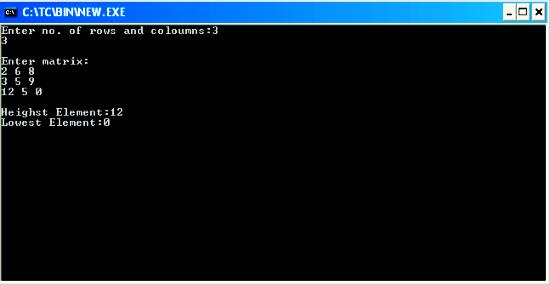
#include<iostream.h>
#include<conio.h>
void main()
{
clrscr();
int m,n,a[10][10],i,j,high,low;
cout<<"Enter no. of rows and coloumns:";
cin>>m>>n;
cout<<"
Enter matrix:
";
for(i=0;i<m;++i)
{
for(j=0;j<n;++j)
cin>>a[i][j];
}
for(i=0;i<m;++i)
{
high=a[0][0];
low=a[0][0];
for(j=0;j<n;++j)
{
if(a[i][j]>high)
high=a[i][j];
else
if(a[i][j]<low)
low=a[i][j];
}
}
cout<<"
Heighst Element:"<<high<<"
Lowest Element:"<<low<<"
";
getch();
}
Tuesday, February 10, 2015
Thursday, February 5, 2015
Android beginner tutorial Part 54 Activities and processes
So far weve only included one Activity in all our previous examples. In reality, applications usually have multiple Activities. There are a few things we should know before proceeding to actually creating and working with multiple Activities.
Even though an application can have multiple Activities running at the same time, one of them is marked as "main". It is the one that is the first to load once the application is started.
It should also be noted that an application is capable of invoking not only the activities whithin that application, but also activities that belong to other applications.
When at least 1 component in an application is needed, the Android system launches a process that contains a single thread for running the code. By default, theres just one main thread for the process. It is, however, possible to add new threads, which we did in some of the previous tutorials (for example, when handling progress bars). It is recommended to keep processes that might freeze the application in separate threads. These are processes like downloading, calculating, uploading, etc. The Android system might want to stop a thread process if its taking too much memory and that memory is needed for other more important processes.
Android chooses which processes to destroy based on their priorities. There are 5 different process priorities, from most important to least important - Foreground Process, Visible Process, Service Process, Background Process and Empty Process.
A process is considered a Foreground Process if: user is currently interacting with the activity thats hosted by the process or the service thats related to that activity, or if the process hosts a Service object that is running in the foreground (startForeground() has been called) or it is executing one of its lifecycle callbacks (will talk about these callbacks later), or if the process hosts a BroadcastReceiver object that is executing its onReceive() method.
There may be more than one foreground processes running at the same time and they are killed only in critical situations, when memory is so low that these processes are unable to continue to run.
A Visible Process is the one that has a component, which the user can still interact with, even though it is not focused, but still visible. This can happen if theres an Activity that partly covers another Activity (a dialog box, for example). This process is considered an important one and wont be destroyed as long as there are processes with lower priorities running.
The next process is a Service Process, it executes a Service and doesnt belong to any of the previously mentioned process types. Services are usually not attached to an interface and their purpose is to execute actions that the user needs to run in the background. An example of this is a music player that plays music in the background while the user does something else.
A Background Process is the one that is not visible to the user and does not impact their experience at all. There are usually many of these running at the same time, but they are stored in a list and ordered by the last time the user used the application. This way, the most recently used app will be killed last out of all the background processes.
An Empty Process is the one that doesnt hold any active application components and is just kept alive for caching purposes (in order to improve the startup time of some components) and has the lowest priority out of all processes.
Now lets talk about Activity states.
There are 3 possible states: active (running), paused and stopped. An active Activity is the one that the user is currently interacting with. A paused one is the one that has lost its focus, but is still visible to the user. It is considered stopped if it is completely covered by another activity. It can be killed by the system if theres memory needed for more important processes.
Earlier in this tutorial I mentioned lifecycle callbacks. They are protected methods that are called when the application changes its state. There is a nice scheme on the official Android dev site which I really like and am going to shamelessly present here:

As you can see, there are 7 callback functions in total. Out of them all, only one is necessary in each Activity - onCreate() mehod, which we frequently used in the previous tutorials.
If you carefully examine the scheme, youll see all the 3 states Ive mentioned - running (labeled Resumed in the scheme), paused and stopped. All the callback functions are called during the transition from one state to another and are quite useful. We will focus on them more in the future tutorials.
Thats all for today.
Thanks for reading!
Wednesday, February 4, 2015
Remove password pattern lock and hard reset your Nokia X
This can fix the following issue:
1. If you forgot your gmail account
2. If you forgot your pattern lock
3. If you forgot your password
4. If your phone stuck up in LOGO only, this work sometimes if the firmware is not totally damage.
5. If you the apps are force closing automatically.
Again, if you are going to hard reset / factory reset your data will be deleted. Like games, applictions, calendar sync, etc.. etc.
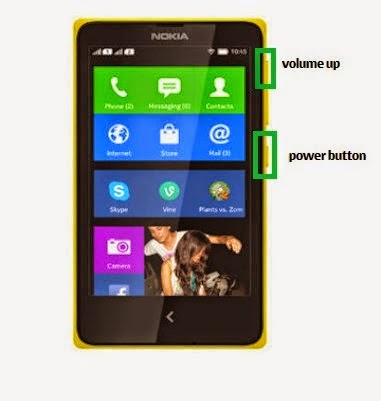
Here is the procedure:
1. Turn off your phone
2. Press and HOLD VOLUME UP and Power Button
3. Release the POWER button when the Nokia Logo appear, but keep on holding VOLUME UP.
4. Press the VOLUME Rocker to navigate and Power key to confirm.
5. Select wipe data / factory reset
6. Reboot your phone.
I hope this tutorial helps ;)
Copy And Extract Text From Images With GT Text Quicktip
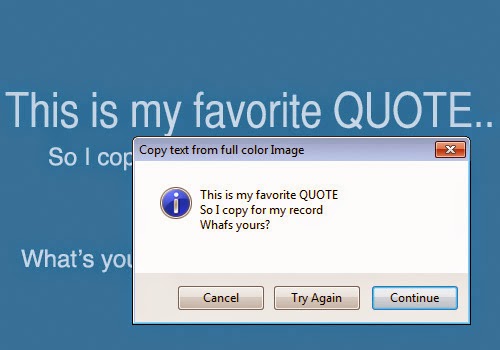
Copy Text From Images With GT Text:
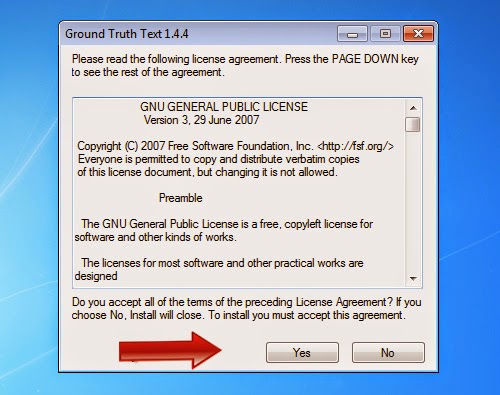
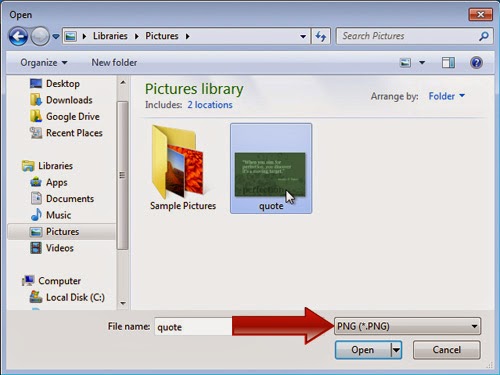
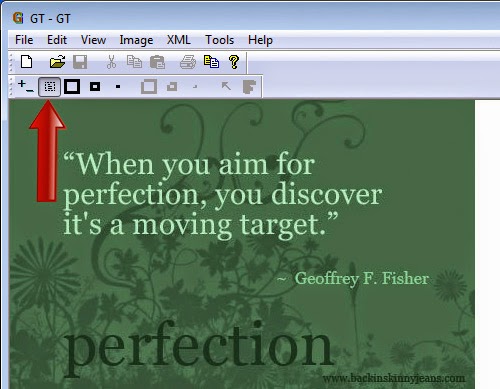
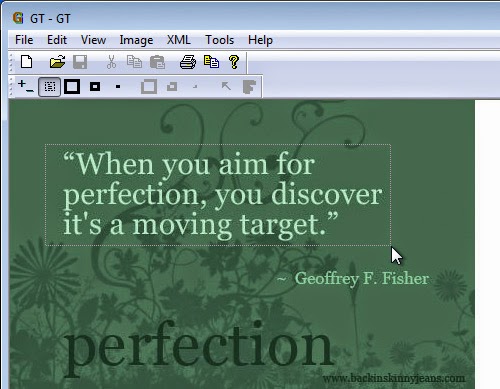
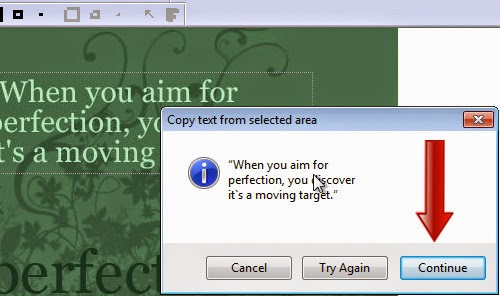
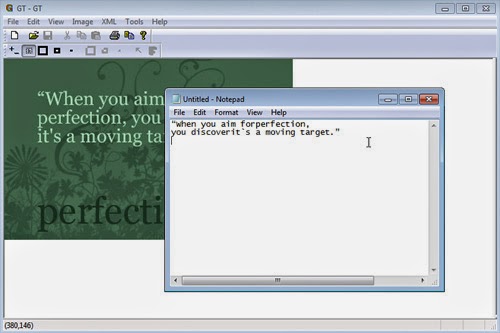
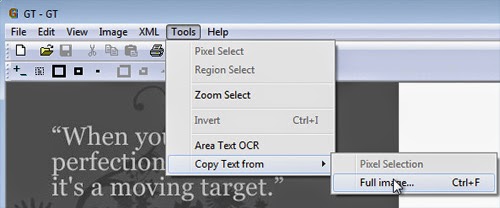
Other Features:
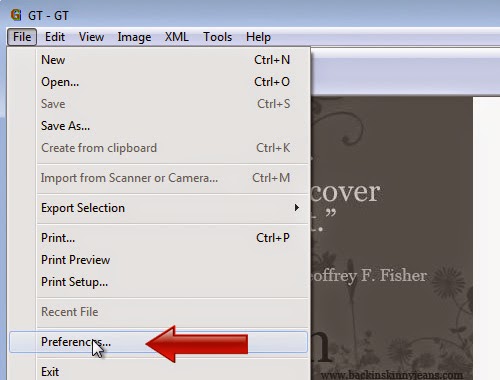
1. Go to File > Preferences.
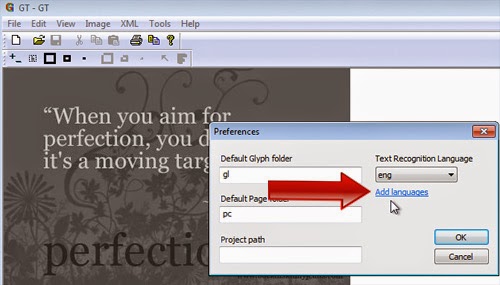
2. Click on Add languages.
Conclusion:
Tuesday, February 3, 2015
Huge discount for educators and students from authorSTREAM

Teachers and students can apply with their official(school/college/university) email address and get Pro membership for $24.95(yearly), which otherwise costs
This special education discount offer expires on 30th September, 2009.
Sunday, February 1, 2015
Hard Reset your DTC GT5S A Junior Duo and remove password pattern lock and gmail account

Hard resetting / factory resetting your phone will solve the following issues:
1. If you forgot your pattern lock
2. If you forgot your gmail account
3. If you forgot your password
4. Apps that automatically force closing
5. Stuck in DTC Logo (sometimes does not work if the firmware is totally damage)
NOTE: Performing hard reset will erase your data.
To hard reset:
1. Turn off your phone.
2. Press and Hold first the POWER Button and then immediately Press and HOLD VOLUME UP until you see the Android Robot.
3. Press the POWER Button to activate Android System Recovery (or you can try all buttons if power button did not work, I had a slight memory lose there :D.)
4. Select wipe / factory reset, press Volume rocker to navigate and press the VOLUME UP to confirm your selection
5. Reboot your phone.
Note:
If performing hard reset did not succeed, you need to wipe the cache first in the android system recovery before performing wipe / factory reset.
I hope this tutorial helps you.. If you have any question just drop a comment.