Tuesday, March 10, 2015
Allowing the user to select Google Drive files from your application
If your application needs a way to let users easily choose a file from their Drive, this is for you.
Users can browse and select files from their Drive file list using the Google Picker API. The Google Picker API provides a user interface containing a list of all the users files in Google Drive.
Since the user interface is generated by the Picker API, there is very little effort in adding the Picker to an existing site. This article will show how to use the picker for your application, and discuss some of the configuration options.

First create a view on the data describing the type of Picker that we will be using. In this case, we’ll use google.picker.ViewId.DOCS. For more types of Picker, see the documentation.
var view = new google.picker.View(google.picker.ViewId.DOCS);
You can set the MIME types to filter the list of files. This allows you to specify your application’s specific file types to display to the user.
view.setMimeTypes("text/plain,text/html");
Use a PickerBuilder to set the required configuration parameters for your Picker.
  var picker = new google.picker.PickerBuilder()
    .enableFeature(google.picker.Feature.NAV_HIDDEN)
    .setAppId("your app id")
    .addView(view)
    .setTitle("Select a Text File")
    .setCallback(pickerCallback).build();
Once configured, the picker can be popped up to the user as often as you like, using
picker.setVisible(true)
When a user selects a file with the Picker, the callback set in setCallback is called with the data from the dialog. Pass this callback as the action to perform when a user selects a file in the Picker.
  function pickerCallback(data) {
    if (data.action == google.picker.Action.PICKED) {
      var fileId = data.docs[0].id;
      alert(The user selected:  + fileId);
    }
  }
Check the data’s action, in this case google.picker.action.PICKED, and if it is appropriate, access the file ID as the the first element of the docs attribute.
Here are some additional tips on customizing your Picker.
- You can allow the user to select multiple files. There will be more than one element in the data’s docs array, each representing a selected file.
  var picker = new google.picker.PickerBuilder()
    .enableFeature(google.picker.Feature.MULTISELECT_ENABLED)
- You can hide the navigation bar.
  var picker = new google.picker.PickerBuilder()
    .enableFeature(google.picker.Feature.NAV_HIDDEN)

For a complete example, including how to load the Picker library, please visit our the Drive SDK documentation. Also, see the Picker API documentation for more information.
 | Ali Afshar profile | twitter Ali is a Developer Programs engineer at Google, working on Google Docs and the Shopping APIs which help shopping-based applications upload and search shopping content. As an eternal open source advocate, he contributes to a number of open source applications, and is the author of the PIDA Python IDE. Once an intensive care physician, he has a special interest in all aspects of technology for healthcare. |

From a need to a startup thanks to a Google hackathon
A few weeks ago, Clément and I started to take online courses (based on videos), mainly on Coursera, edX (the MIT-Harvard venture), and Udacity, the biggest online course providers.

Obviously, continuing to improve the app based on feedback is our top priority.
Thanks a lot to the Drive team who organized this hackathon to give our idea a try through their amazing tools! And this is just the beginning of the adventure, that started from a problem we faced, whose solution has been found at the Google hackathon, and which is just starting to reach its potential.
 | Arnaud Breton profile Arnaud Breton is passionate about the impact that technologies have on the world. He is the co-founder and CTO of UniShared / VideoNot.es. |
Monday, March 9, 2015
Google Apps to Snail Mail in 3 easy steps

The days of the paperless office are not yet upon us, with physical mail delivery still popular for many types of communication including marketing information, financial documents and greetings cards. Over 5000 companies in the UK now use CFH Docmail to print, stuff, and deliver their mail, resulting in over 6 million documents being sent every month. By creating Docmail Connect for Google Apps, we at UK Google focused systems integrator, Appogee, have made it simple for Google Apps users to personalize, print and mail their Google documents..
As well as allowing users to send snail mail from the Google Apps menu, we made the code library for Docmail Connect for Google Apps available in project hosting. Other Google Apps Marketplace providers, such as CRM and ERP applications, can now benefit from being able to easily integrate their applications with Docmail services.
The Challenge
In order to implement the solution we needed to take the Docmail web services and create a Python interface to them. To achieve that we needed a simple Python to Web Services layer we could rely on which would allow us to build the bridge between Google App Engine and Docmail’s API, and then we needed to make the bridge work from Google Docs to the CFH Docmail service. The final challenge we faced was achieving a seamless experience for the user which meant focusing on performance each step of the way.The Solution (in 3 easy steps)
Step 1: Invoke a SOAP Web Service from App Engine using Python
- The HttpTransport class has a u2open method which uses python’s socket module to set the timeout. This is not allowed on App Engine, and the timeout setting can be set later using App Engines urlfetch module. The timeout line was removed in a new method:
def u2open_appengine(self, u2request):
tm = self.options.timeout
url = self.u2opener()
# socket.setdefaulttimeout(tm) cant call this on app engine
if self.u2ver() < 2.6:
  return url.open(u2request)
else:
  return url.open(u2request, timeout=tm)
transport.http.HttpTransport.u2open = u2open_appengine - The SUDs library has an extensible cache class. The SUDs library provides various implementations of this, however we wanted to use the App Engine memcache for performance. To do this, we implemented a new class to use memcache, as shown below:
class MemCache(cache.Cache):
This was then plugged into the SUDs client class by overriding the __init__ method.
def __init__(self, duration=3600):
self.duration = duration
self.client = memcache.Client()
def get(self, id):
return self.client.get(str(id))
def getf(self, id):
return self.get(id)
def put(self, id, object):
self.client.set(str(id), object, self.duration)
def putf(self, id, fp):
self.put(id, fp)
def purge(self, id):
self.client.delete(str(id))
def clear(self):
self.client.flush_all() - We can now use the modified SUDs client class to make SOAP calls on App Engine! The full source code for this is available in project hosting.
Step 2: Google Docs to Docmail
CFH publish a full API to allow developers to integrate their applications with Docmail, a subset of which needed to be used by Appogee to create the interface for users to create mailings from Google Docs. Not every Docmail function is enabled in the wrapper, but the principles used can easily be extrapolated to any other function, and the key to it is getting a satisfactory link from Google Docs to Docmail.The Docmail API can accept documents in a variety of formats including doc, docx, PDF and RTF. In order to use the API, we would need to extract Google Docs content in one of these formats. The Google Docs API has support for exporting in doc, RTF and PDF. We experimented with each before settling on RTF, which, although large in file size, did work. However the Google App Engine urlfetch library has a 1MB request limit, so we were not able to send files larger than 1MB. We evaluated a number of workarounds such as cutting the files up into chunks and sending them separately, bouncing the files off another platform but our only option was to simply prevent files larger than 1 MB from being uploaded. To achieve this we used Ajax calls to check (compute) the file size in real time as they are selected and provide appropriate feedback to the user. The file size cut off is a configurable parameter, so if Google increase the limit we can adjust the app without redeploying the code.
Breaking this integration down, we used the Google Docs API together with the Docmail SOAP API, via our modified implementation of the SUDs library as described in step 1.
The Docmail API must be used in a logical order, to coincide with the wizard pages on the Docmail website. We can illustrate these steps in order:
- Create an instance of the Docmail client, which is an extension to the SUDs client class. The client contains the methods we need for further communication with the Docmail API:
docmail_client = client.Client(USERNAME, PASSWORD, SOURCE)
- Create / Retrieve a mailing. To create a new mailing, we create an instance of the Mailing class, and pass it into the create_mailing method:
mailing = client.Mailing(name=test mailing)
To retrieve an existing mailing, we need to know the mailing guid:
mailing = docmail_client.create_mailing(mailing)mailing = docmail_client.get_mailing(enter-your-mailing-guid)
- Upload a template document. Since we are retrieving documents from Google Docs to be used as the template, we need to download it first. We do this using the Google Docs API:
docs_client = gdata.docs.client.DocsClient()
We now need to extract the document. There are various formats you can do this in, but we found by experimenting that RTF worked best, despite being the largest in file size.
# authenticate client using oauth (see google docs documentation for example code)file_content = docs_client.GetFileContent(uri=doc_url + &exportFormat=rtf)
And finally upload the template file to docmail:docmail_client.add_template_file(mailing.guid, file_content)
- Upload a Mailing List Spreadsheet. This is similar code to uploading a template:
docs_client = gdata.docs.client.DocsClient()
file_content = docs_client.GetFileContent(uri=doc_url + &exportFormat=csv)
docmail_client.add_mailing_list_file(mailing.guid, file_content) - Submit the mailing for processing. The mailing needs to be submitted for processing. Once this has been done, a proof is available for download.
docmail_client.process_mailing(mailing.guid, False, True)
- Finally, we approve and pay for the mailing:
docmail_client.process_mailing(mailing.guid, True, False)
Step 3 - Performance
When creating a system like Docmail Connect for Google Apps, overall acceptability of the system will be driven as much by performance as by functionality, so we paid particular attention to the key components driving this.We were conscious that some Google Apps users may have a lot of Google documents, so presenting all of them for selection to a user wasn’t an option. Instead, we load 100 at a time (the default), and send them to the browser using XHR calls so it all happens without the user having to do anything and works quite fast - the user can now select from 1000s of documents within a few seconds.
Next we had to address the connection to the Docmail API, where care must be taken to achieve acceptable throughput. Queries to the API had to be minimized and we didnt want the page submits to be slow - the user should be able to go from one page to the next as quickly as possible. To achieve this, we used the App Engine Task Queue. When a user submits a page which requires communication with the Docmail API we fire off a Task Queue to do the work for us, and then simultaneously navigate the user to the next page in the process. This means that the server is working while the user progresses the workflow. This also means handling timeout errors is easier, as the Task Queue can catch the errors and reinstate another task. But it requires some extra planning as some tasks will not complete until others finish, and process checking needs to ensure new tasks only get fired off when the appropriate time has come.
We hope the wrapper, together with the key learnings written up here will encourage others to have a go at wiring their applications to the Docmail delivery services.
Want to weigh in on this topic? Discuss on Buzz
Migrating to Google Apps just got easier
Ever wondered how to move your organization’s emails from a shared mailbox or a public folder when migrating to Google Apps for Business?
We’ve just launched the Google Apps Groups Migration API that provides Google Apps developers the ability to build tools that can move shared emails from any data source (typically shared mailboxes, public folders and discussion databases) to their domain’s Google Groups discussion archives. Google Groups provides a simple and easy way to ‘tag’ the migrated emails into manageable groups that can be easily accessed by users with group membership.
This new api complements existing Google Groups api’s like Google Apps Provisioning API which can be used to create new groups (to which the shared emails can then be migrated using the newly launched API) and Google Apps Groups Settings API which can be used to control access to the group. The addition of the Google Apps Groups Migration API thus makes the ‘shared folder’ experience seamless even after migration to Google Apps. To learn more and try out this new feature visit Google Developers.
 | Rishi Dhand profile Rishi Dhand is a product manager working for the Google apps for business team. In addition to working on data migration features, he also works Google apps administration platform with focus on building new security and admin reporting features. In his free time, he enjoys playing squash and badminton. |
Tuesday, March 3, 2015
How to Recolor an Image in PowerPoint

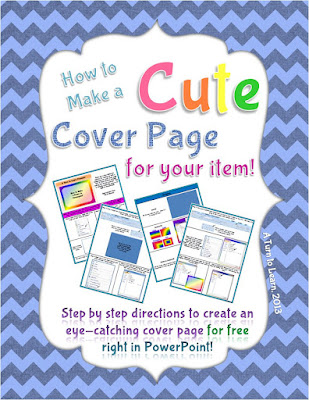
I actually wrote this tutorial months ago (back in March 2013, yikes!) for my TPT book "How to Make a Cute Cover Page for Teachers Pay Teachers." This item organizes some of my most important tutorials in a way that is easy to follow and prints perfectly on letter paper. If you like this tutorial or my other tutorials, be sure to check out this product on TPT!
Anyway, onto the poll!



For next weeks tutorial, Ill be adding "How to Create a One Page Folding Book" to the poll (just like the one below). Be sure to vote!


How to Superimpose Text on a Image

Thank you so much for visiting my blog each week and voting!

First things first, download Gimpshop so you can practice along with the following directions! Gimpshop is the same program we used to give a picture a transparent background and blur out faces/names in a picture, so you may have already downloaded it. If not, be sure to download it for free!
Now... lets put that text in place!


Thank you for visiting this Technology Tuesday Post! Be sure to vote for what I should blog about next Tuesday!
Using Twitter to Amplify Connective Learning and Sharing at ICEL 2010

- Ludwig Wittgenstein
#ICEL5

Besides this, I would like to highlight that if you are an active Twitter user, Monitter might not be the ideal tool to monitor/track a word, phrase or hashtag (e.g. #icel5). Instead, you might as well use the Search function in Twitter, and then save the search, which you can follow.
Another tool you might want to consider (among several) is TweetDeck, which provides you a host of excellent features to track whatever you want, and also enables conveniently to update your own Twitter world. If you are using an IPhone, you are probably going to love the TweetDeck application.
Alright, so did the #icel5 learning stream idea work?
THANK YOU!
But, before going into that, I would like to thank everyone involved with the 5th International Conference on e-Learning (ICEL 2010) for making it a sizzling learning adventure (Universiti Sains Malaysia, Penang, Malaysia 12-13 July 2010).
Also, I would like to give a special thanks to Prof. Rozhan M. Idrus (Conference Chair) for inviting me personally, and making it a memorable and exciting learning adventure throughout, starting from Japanese sushi to promoting my blog (Say no more!).
In addition, Frashad Shah deserves a big thank you for picking me up from the airport and making my trip to the hotel smooth and easy. Yes, he will be joining IMU e-Learning team next month, and I am sure we can fuse our brain waves to innovate and inspire our Universitys e-learning ambition to new heights. Cant wait!
Besides this, Sue Nugus (Organizer), Issham Ismail (Programme Chair), David M. Kennedy (Keynote Speaker), Laura Czerniewicz (Keynote Speaker), Brant Knutzen (Best Speaker and Swimmer!!!), and Ben Archer (Best Twitter #icel5 user, heads down!) were amazing. In addition, I got to tickle Philip Balcaens Critical Thinking brain a bit, which was kind of fun.
There were around 100 participants from 19 countries that attended, and that certainly made it more exciting. I probably chatted with at least 60% of the participants, and learned too much to babble it here...!
Click here to view the ICEL 2010 Photo Gallery...
SO, DID #ICEL5 WORK?
Out of around 100 participants at the conference, only nine (9) joined (including me) or shared tweets using the #icel5 hashtag. I believe many in the audience were kind of new to Twitter (or were clueless). Prof. Rozhan Idrus did a great job in promoting the #icel5 hashtag (and my blog) during his opening speech.
However, next time we should perhaps facilitate a 10-15 minute Twitter tutorial (unless everyone is already using Twitter) to get more participants involved.
Here is a sizzling visual illustration of all the people that contributed to the #icel5 learning stream:

If you notice, you will actually notice that around 30 people (3 times more!!!) from the Twitter world (gray icons) also contributed to the #icel5 learning stream, one way or the other. Did we invite them to join? Of course not! They probably saw some interesting tweets while following our tweets, and then simply gave us their piece of mind, or retweeted interesting stuff here and there. Interestingly, a few of the tweets were even translated into Spanish (example).
So, was it a success?
Difficult question to answer! Below is a birds eye view of all the #icel5 tweets (230+) shared over the 2-day e-learning conference:

Cool graphic, but I want to review and learn something from these 230+ #icel5 tweets; Not just bells and whistles (and a octopus!)? No, problem! Here we go:
Not, bad! Surely, it could have been more participation, but overall it did generate some really interesting connections, ideas, reflections and resources. From a personal learning point-of-view, tweeting kept me busy thinking and pondering throughout the conference. I only felt sleepy towards the end of the whole conference. Usually, you will see me practically sleeping before the 2nd speakers is done (unless the presenter is awesome!).
So, what did I learn?
10 LEARNING NUGGETS
Here are 10 interesting things I learned during this e-learning conference:
- Paul was right!
Yeah, Paul the octopus (above) guessed 8 out of 8 matches during the 2010 World Cup, but would he have predicted that we would start an e-learning conference four hours after the World Cup final. What were they thinking? Luckily, I managed to survive the first day, thanks to a bit of yoga breathing exercises and a 1000 ml Vitamin C tablet. - IPhone is a sizzling mobile learning device!
Alright, I am surely going to pursue an IPad once the price goes down a bit, but the IPhone is not a bad alternative. I did actually bring along my notebook, but it was never used, because I was able to do all the necessary learning and sharing activities using my IPhone. For example, I used the IPhone to tweet, take pictures (upload them using Twitpic), reply e-mail, read online newspapers, play games, listen to podcasts, search, moodle, etc. - Might not make the British swimming team for 2012 Olympics!
I got hooked on swimming last year (2009), and have ever since been swimming 2-3 times week. For the sake of fun, I have set an audacious goal (Nothing is impossible) to make the British swimming team for the 2012 Olympics. And I thought I was on track (seriously!), but then I got into a 50 meter freestyle race with David Kennedy (Australia) and Brant Knutzen (USA) at the hotel (Equatorial). They were going to race (for fun), and I thought why not test my ability against these two 50+ year old dudes. This should be easy, right? I went all out, but within 25 meters, Brant Phelps Knutzen was propelling his feet past my face, and I was crushed as badly as England was against Germany during the 2010 World Cup. I suppose Im kind of British after all! Anyway, I am not targeting to make the sprint team, but instead I will go for the ultimate manhood test: 15oo meters. The world record is around 14.35 min. and I am currently capable of 36.53 min. (was 50 min in April, 2010). It looks bad, but I still got two (2) more years to go. Yes, I am certainly British :) - Mahoodle could rock!
What? You get a Mahoodle, when you mash-up Mahara with Moodle. In pedagogical terms, you combine these two tools to facilitate both teacher (Moodle) and student centred (Mahara) learning, according to David Kennedy. It looks promising, and if you want to know more, just CLICK HERE. - Free Internet Access is a Fundamental Human Right!
Actually, I have been babbling about this before, but after listening to presenters from several so called developing countries it would simply be amazing if we could make Internet as easy to access as National radio and TV channels. Or think of it as a Digital Democracy, whereby not only do we have a right to vote, but also a right to free access to the Internet, or learning resources around the world (Explore Lauras reflective Keynote: Digital Native in a New Era: Apartheid or democracy). Why not? Within five (5) years, I believe the world will be fully wired, but will it be a better one (or more learning friendly)? With an accessible free global network, we might be able to do some amazing things together. What do you think? - Resistance to E-Learning is still Global!
You would think that lecturers in countries like England and Australia would not be so resistant and negative to implementing e-learning at their learning institutions. But, the truth is that it is probably as common there, as it is here in Malaysia. But then again, if they have been exposed to crappy e-learning content and environments, how can we blame them (or us)? So, who do we inspire first to adopt e-learning, the students or the lecturers? Do we really need e-learning? Perhaps, we should just call it LEARNING. What do you think? I got some great ideas (I think), but lets discuss them in another post. - Highly interactive discussions through small learning groups!
In the past we wanted to use self-paced e-learning to train millions at a time. But, today we are increasingly realizing the power of learning through small groups, whether online or offline. Brant Knutzen discovered through his research that 4-5 members per group is ideal for facilitating dynamic online discussions in terms of getting more responses and replies. Any thing to add? - Be PREPARED! Seriously, be prepared!
Besides listening to some amazing keynotes and paper presentations, there were a few that made me wonder...What were you thinking? For example, one presenter shared her findings exploring Mobile learning with 20 students, by simply showing a table with 20 rows of raw data (comments by students). And she summed up that most of the participating students didnt like mobile learning. Interestingly, a person sitting next to me, summed up within seconds that 70% of the students didnt like mobile learning, by simply looking at the table. Worse yet, when I asked her what kind of mobile devices these 20 students were using during the research, she couldnt even answer that question accurately, and fumbled... I think... Worse yet, when you look at the first students comment in the table, it basically noted that the student had no Internet coverage. I mean, who would enjoy mobile learning without Internet access. Worse yet, the presenter was an Associate Professor, and you would expect that if you have reached that level, you would have at least an analytical or scientific mindset, but I suppose that is not necessarily the case. In short, if you are going to present anything, be prepared, and try to explore all possible scenarios and questions for whatever you are researching. If you question yourself and what you are doing, it is not so difficult. Oops, I might be wrong! - Prezi is not so great after all!
Interestingly, three (3) of the presentations I attended used Prezi to present their story or research. Yes, it is really cool, trendy, and you kind of get swooshed away with no slides and amazing zoom-in-and-out elevations through a big learning map, or may I say a Picasso painting. However, after viewing a few Prezi presentations, you kind of get bored with it (They all look the same, just like PowerPoint!). Well, I do. And one presenter summed it up nicely, by saying, It is a real headache developing one" (if I heard it correctly!). Whatever tool you use, the bottom line is substance. If you have substance, then design makes sense. But design without substance, is a joke. But, if you have both substance and design, then WOW! And I would argue that PowerPoint (2010) is a more complete tool (including picture editing) to sizzle. I know, Apple dudes are going to scream, Keynote... Whatever! It is fun experimenting with tools like Prezi, but until they have real Power, like PowerPoint 2010, then forget it. I am not joking! - Mobile Learning is the FUTURE!
Period...! We should not ignore this, but instead embrace the amazing possibilities to reach out to billions of people out there around the world. I used my IPhone for all my learning and sharing activities during this 2-day e-learning conference, and it was simply an amazing tool for learning. I am now dreaming of an IPad, and imagine students not needing to carry a heavy bag full of books, and having instead an A4-sized learning device enabling them to read, interact, play and connect with learners all over the world. What are we waiting for?
CONCLUSION
In conclusion, I have to admit I didnt learn so many new things during this conference. I suppose when you subscribe to OLDaily and RSS most of the top learning professionals around the world that is a difficult prospect and mission.
But then again learning is so much more than simply learning new knowledge and following trends, whether it Web 2.0, 3.0, 4.0 or 10.0. Looking back, I am really excited to have connected with some amazing learning professionals, and hopefully I can continue to learn from and interact with these geniuses.
Finally, you can say what you want about Twitter, but for me, it rocks for learning! Why? It rocks, because it empowers me to connect, interact, and learn from people all over the world. And using a hashtag (#) to connect and collectively think (out loud) makes it even more convenient and dynamic. What do you think? Any better alternative (besides a Facebook wall!)? :)
LATEST NEWS: #ICEL5

Monday, March 2, 2015
IMU LS 03 How to Become a Rapid E Learning Pro Tom Kuhlmann

Date : 8th February, 2012
Venue : Online (WizIQ)
Time : 10.00 AM (Kuala Lumpur Time)
Description:
Speaker:
Delete One Word To The Right!
If you want to delete the word to the right of where your mouse is positioned, just use this little shortcut in Word or PowerPoint!

25 EduBlogs You Simply Don’t Want to Miss!
- SlideShare Version
- 5-Part Link Visualization Series
- PDF Version (21 MB)

- Steve Ballmer
Since there are more than 112 million blogs (tracked by Technorati) out there, surely we are going to struggle a bit to find juicy educational blogs or EduBlogs (if that is what we are looking for!). However, since I have found a few really juicy ones, why not share them with you in a visually attractive manner? So, if your logical mind is not triggered to explore, perhaps your right (or creative) mind will assist you. If you havent slammed their blog URLs in your RSS reader already, you might enjoy this final (for now!) link visualized presentation. Nope, this time around no quick links. Lets enjoy my effort to stimulate your learning and connect you to new windows (beyond Microsoft) of learning.
To be honest, I could have easily added another 100 super duper EduBlogs, but I believe these 25 are enough to get you started on a learning journey that will probably connect (Connectivism!) you to a world of learning that perhaps you did not know exist. I suppose some of you are already familiar with most of the ones I have selected. If you have other great EduBlogs to suggest, please feel free to add them in the comment section. I would surely like to discover a few more juicy EduBlogs that can inspire my learning further.
RECAP - LINK VISUALIZATION SERIES
Here are the other four (4) link visualizations again (if you missed any):
- 101 Free Learning Tools
- 101 Open Educational Resources
- 101 Free EduGames
- Amazing Free e-Learning Ebooks Collection
Sunday, March 1, 2015
LectureShare Share Your Lecture Notes to the World
 In a Nutshell
Is it Really Free?
"Right now LectureShare is completely free with no limitations, and were working hard to keep it that way!" (That is what they say! Lets hope the "right now" statement becomes a long-term project.)
Yummy Stuff?
Current Available Features:
- Give students access to course materials without the burden of maintaining your own webpage or the hassle of complex web-based solutions
- Post audio and video content easily
- Make class announcements that your students will actually read—via e-mail, RSS (coming soon), or SMS
- Effortlessly make your course available to anyone if you choose.
- Stay organized with course materials and announcements for all of your classes is gathered in a single location
- Beyond text—enjoy streaming audio and video content along with text and files
- Keep track your way: e-mail, RSS (coming soon), or SMS. No more checking class webpages for updates every day.
- Tap into the power of open source courses on hundreds of topics."
MasterMinds Behind LectureShare?
- Ezra Katz - Mastermind behind LectureShare, as well as the primary developer.
- Nathan Carnes - freelance website developer and graphic designer in charge of design and user experience.
What to expect in the Future?
"LectureShare is currently in early beta. You can expect plenty of improvements over the next few months as we gather user feedback. Were working hard to make LectureShare the best platform available for both instructors and students."
Learning Reflection
I learned about this new learning tool via Jospeh Harts blog (who learned about it via Jane Knights blog, and she learned about it via bla,bla,bla,...). I really like the fact that this new easy-to-use learning tool (as far as I know) starts of with only the basic and fundamental features (course materials and announcements) that most lecturers or instructors would like to use to get their online learning adventure (or access) moving ahead. Also, now educators dont need to move around (from LMS to LMS) their course materials should they decide to join another University, College, School or Organization. In short, Publish Once for All! Though, it could be difficult for students to keep track of the announcements for each course if the educator is handling one course for multiple classes or Universities (Then again, I am sure they have thought about that!). However, I really like the SMS announcement ability and the upcoming RSS feature (dont need to visit the site for updates).
Overall, these two masterminds behind LectureShare in some ways got to it going before Google, Yahoo and MSN (as I babbled somewhere in the Future of e-Content Development in Higher Education presentation. Published on Dec. 9, 2005.). However, I do anticipate that for example tools like Google or Yahoo Groups (why not FaceBook, YouTube or MySpace?) can evolve further to enable educators to facilitate an easy-to-use and effective course-related online learning environment. To me the core features that educators would love in addition to managing their course materials and announcements efficiently online, include social bookmarking (collection of shared online resources or URLs), Forum (Yes, we need to discuss to facilitate the articulation of ideas and learning in relation to the course materials or course), Quizzes (Check for understanding), Assignment (enable students to submit assignments online), Survey (to get feedback, so that we can improve the course or learning materials. Perhaps, could add a comments or rating section for each resource, too), Blogs (quick informal knowledge sharing on the latest relevant updates in the knowledge galaxy), and Wikis (Collaborative content development). Hmm, I suppose it is getting complicated and I suppose I could make it more complicated, but these are some of the features that would be useful to engage and motivate the learner to learn, besides being able to access course materials and announcements easily online.
In short, the era of publishing course materials or courses to one University (, College, or School) might be of the past in the near future. Why publish to my students only, when I can also educate the world at the same time for free? :)
Friday, February 27, 2015
How to Easily Add a Border to Your Pictures!
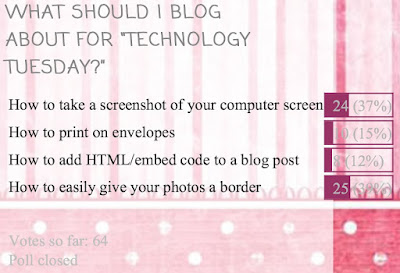
This was the closest poll ever I think! It literally couldnt have been any closer!
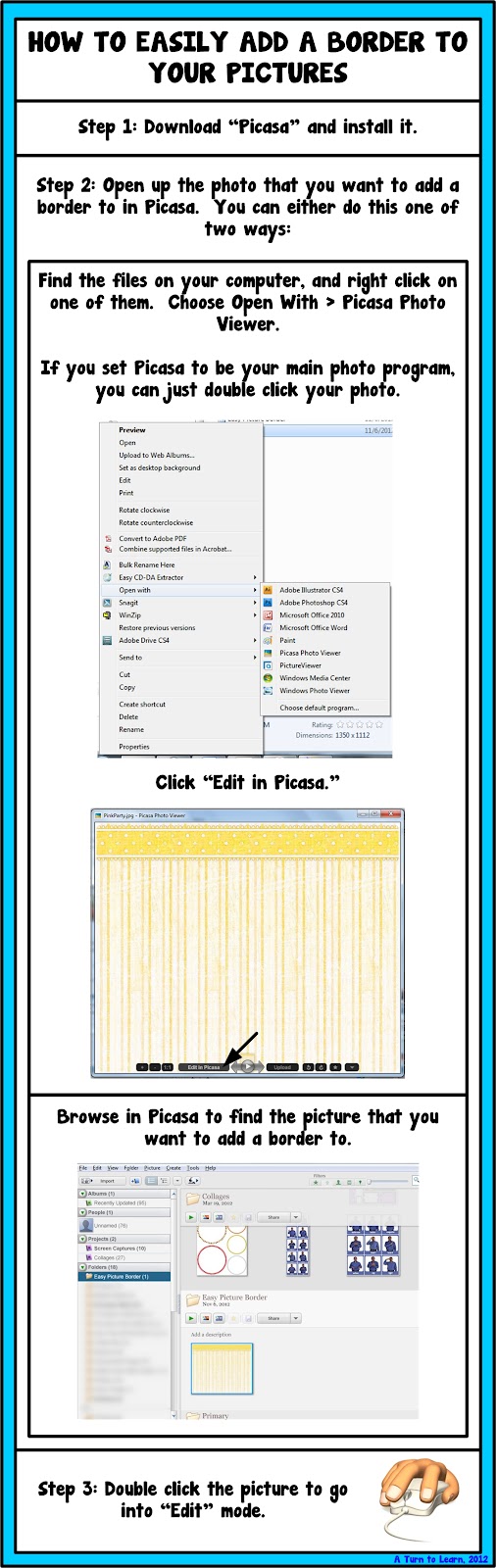
This tutorial uses the program Picasa, which is a free program offered by Google (and I just love it!). You can download it here.
If you already have Picasa installed, click "Help > Check for Updates" and update your version. Its not entirely necessary, but it may give you some neat new features!
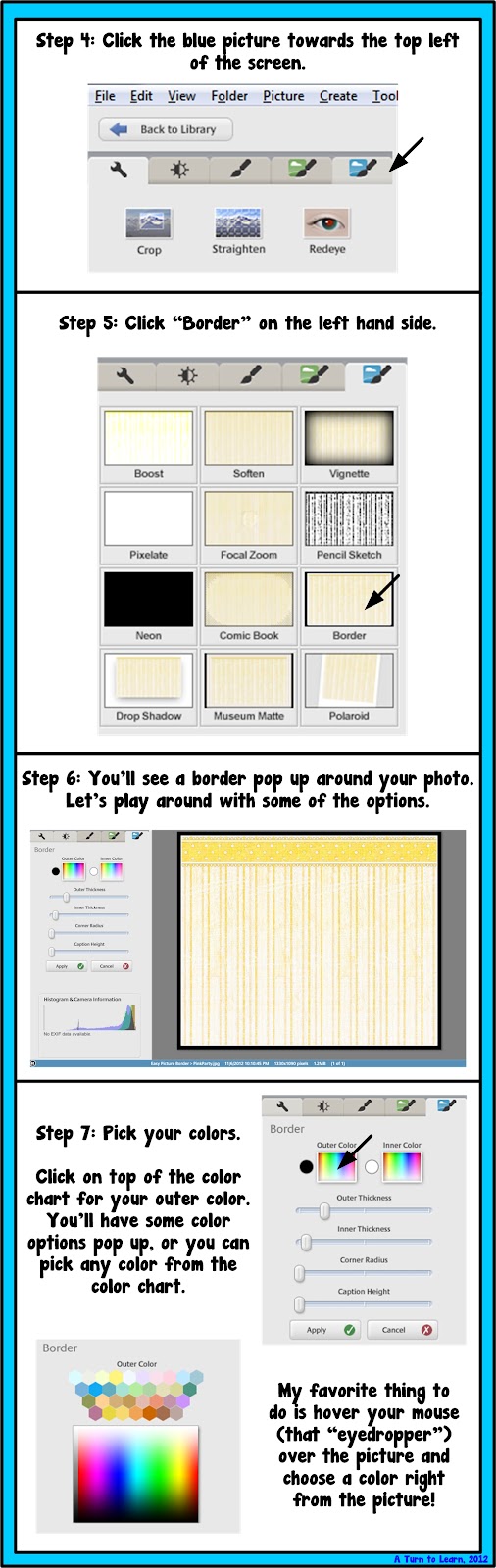
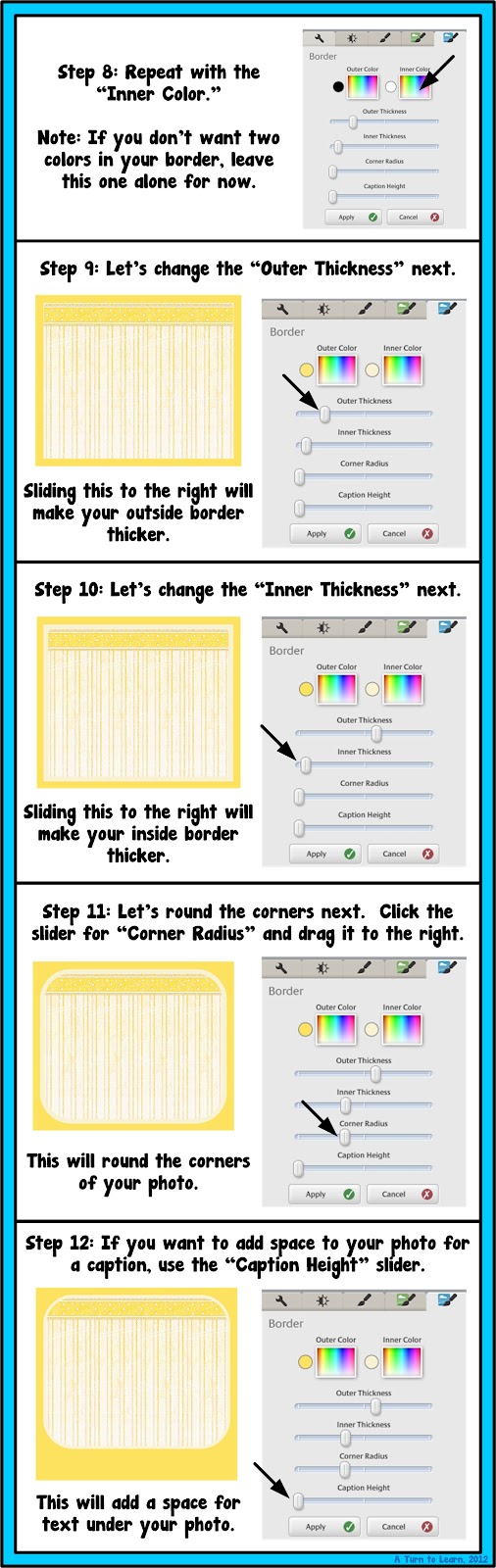
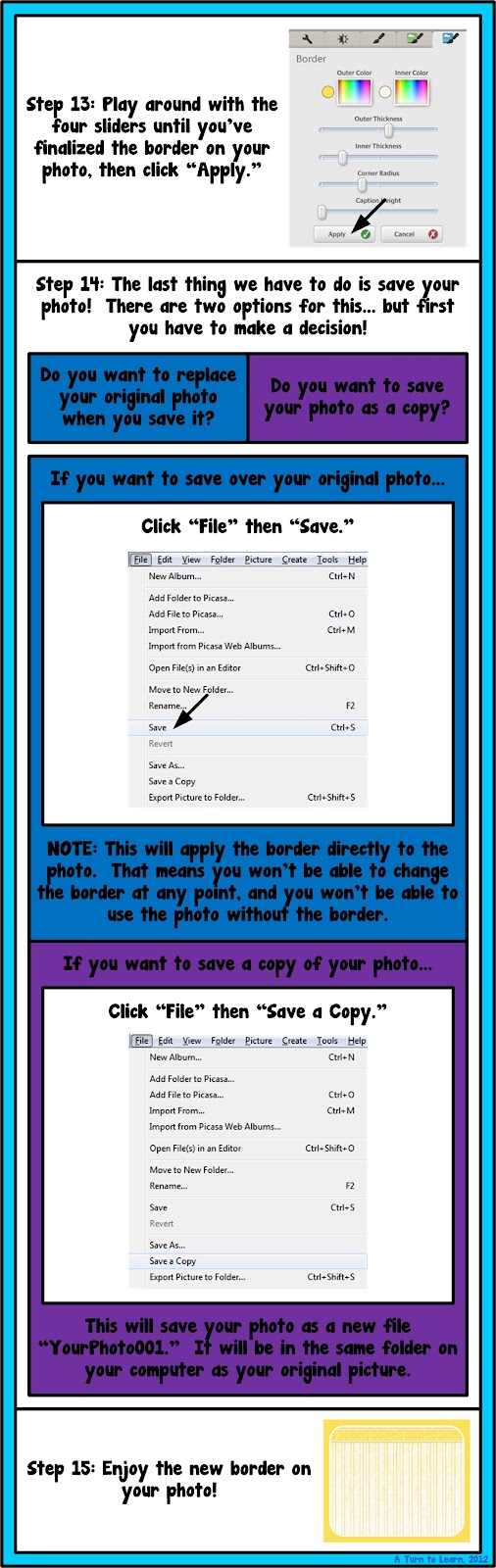
For next week, Ill add an option thats been requested by a few people: how to make an editable powerpoint that locks down clipart and other images! For example, this freebie (which reminds students to write their name on their paper) locks down the border so you cant move it around or copy it to another program.

Thursday, February 26, 2015
How to Organize Your Files for the Week!
If you liked last weeks post about organizing your life with technology, youll love this weeks post as well! The winner of this weeks poll is how to organize your files for the week, using technology of course!

Heres the poll:

Before I go into organizing your files for the week, Im going to talk briefly about organizing your files digitally. I know its a wordy tutorial but I promise I have lots of good tips included!!!

Now for the tutorial... you definitely need to download Dropbox if you dont already use it! If you already use it, keep reading anyway because I have some little trick you still might enjoy!



The next Technology Tuesday post wont be until August 6... because Ill be vacationing with my hubby in Alaska celebrating our TEN YEAR anniversary (technically two years married, but 10 years since we started dating). How crazy is that?

Now, as for the poll... Ill be adding how to give any picture a moving/talking mouth!