Wednesday, March 11, 2015
Managing Projects with Gantt Charts using Google Apps Script
Editor’s Note: Guest author Ronald Dahrs runs Forscale, an IT and project management company based in the Netherlands. -- Arun Nagarajan
Google Apps is well-suited for project management because it’s a cloud-based productivity suite that helps you and your team connect and get work done from anywhere on any device. Using Google Apps Script, we can push the capabilities even further to create advanced scheduling and management tools. A common tool in project management circles is the Gantt chart: a schedule of the tasks in the project and how they relate to each other over time.

The spreadsheet that generated that Gantt chart is available in the template gallery today. In this post, we’ll explore the basics of how the template works and explain a few of the Apps Script techniques that transform Google Sheets into such a powerful project management tool.

When you open the template, you’ll see stubs for each type of task, but the screenshot above shows an example of a slightly larger project plan — in fact, the same data used to generate the Gantt chart below.

The template’s sophisticated formulas rely on the structure of the table to enable schedule awareness and task dependencies. However, we still ensure that the user can rename, rearrange, or add columns by using a hidden header to identify each column. This diagram demonstrates the spreadsheet’s structure:

In Apps Script, we use the spreadsheet’s onEdit() event to monitor user interaction with the schedule portion of the spreadsheet and update the Gantt chart accordingly. The powerful JavaScript language does all the required summary calculations based on the provided dates and completion percentages.
We have also used Apps Script’s addMenu() method to build a custom menu that calls row-oriented functions like indenting tasks to get a so-called Work Breakdown Structure with summary tasks. If you just want to see an overview, the custom menu allows you to collapse tasks, which we accomplished through the hideRows() method.
For changes that do not trigger an onEdit() event (for example, clearing a row), the user can use the menu’s Refresh command to recalculate the schedule.
The template stores user preferences as Script Properties and offers an interactive user interface built in UiApp to change those settings:

Finally, to render the Gantt chart, we use cell background colors to visually group and highlight the appropriate cells. This creates the effect of a continuous calendar with clearly visible start and finish dates for each task.
var ganttColors = ganttRange.getBackgroundColors();
var ganttValues = ganttRange.getValues();

// update Gantt colors and values
ganttRange.setBackgroundColors(ganttColors).setValues(ganttValues);
 | Ronald Dahrs Ronald combines his knowledge of project management and software solutions at his company, Forscale. He believes Google Apps is an excellent platform for online project management. He uses Google Apps Script to integrate the services to manage a wide range of projects. |

Create a custom CRM dashboard using Google Apps Script
Editors note: This is a guest post by Alex Steshenko. Alex is a core software engineer for Solve360, a highly-rated CRM in the Google Apps Marketplace which was recently chosen as a Staff Pick. Solve360 offers many points of useful integration with Google Apps. Today, in contrast to the conventional Data API integrations, Alex will showcase how he extended Solve360 using Google Apps Script. --- Ryan Boyd
Choosing Google Apps Script
Solve360 CRM integrates with Google services to provide a two-way contact & calendar sync, email sync and a comprehensive Gmail contextual gadget. We use the standard Google Data APIs. However, some of our use cases required us to use Google documents and spreadsheets. Enter Apps Script!. What brought our attention to Google Apps Script was that it allows you to run your application code right within the Google Apps platform itself, where documents can be manipulated using a wide range of native Google Apps Script functions, changing the perspective.
Our first experience with Google Apps Script was writing a "Contact Us" form. We decided to use the power and flexibility of Apps Script again to generate different kinds of reports.
Generating Solve360 Reports using Apps Script
Google Spreadsheets can produce rich reports leveraging features such as filters, pivot tables, built-in functions and charts. But where’s the data to report on? Using Google Apps Script, users can integrate Google Spreadsheets with a valuable source of data - the Solve360 CRM - completing the solution.
Solve360 Google Apps Reporting script lets users configure the reporting criteria while pulling reports into a Google Spreadsheet.

Heres a video demonstrating a real use case for Solve360 Reporting:
Designing Solve360 Reporting using Apps Script
User meet “Script”
For this script, we realized, simply providing spreadsheet functions would not be good enough. We needed a user interface to let users configure their account details and define what kind of data to fetch from the Solve360 CRM. Google Apps Script’s Ui Services came in handy. For instance, here is the function responsible for showing the “Solve360 account info” dialog:
/*
 * Creates new UI application and opens setting window
 */
function settingsUi() {
  var app = UiApp.createApplication();
  app.setTitle(Solve360 account info)
     .setWidth(260)
     .setHeight(205);

  var absolutePanel = app.createAbsolutePanel();

  absolutePanel.add(authenticationPanel_(app));

  app.add(absolutePanel);
  SpreadsheetApp.getActiveSpreadsheet().show(app);
}
Working with Solve360’s API
Solve360 CRM has an external API available so the system can be integrated with custom business applications and processes. Reporting script use case is a good example of what it can be used for.
One of the first tricks learned was creating our own Google Apps-like “service” to encapsulate all those functions responsible for interacting with Solve360 CRM’s API. What is the most interesting is that this service’s code isn’t a part of the distributed Google Apps script. Instead the library is loaded from within the script itself directly from our servers. Why? Let’s say we found a bug or added new functions - if we had many copies of the service we would need to update them all, somehow notifying our clients, and so on. With one source, there’s no such problem. You may think of it as a way to distribute a Google Apps Script solution, or, in our case, a part of the solution. The service is called Solve360Service and its usage looks like this:
var contact = Solve360Service.addContact(contactData);
There were two problems with getting such an external service to work: Google Apps Script permissions restrictions and actually including it in the script.
The issue with permissions is that the Google Apps Script environment can’t see which Google Apps Script services are used inside the external service - that’s why it doesn’t ask you to grant special permissions for them. To force the authorization request for those permissions we added this to the onInstall function (called once when script is added to the spreadsheet):
function onInstall() {
   // to get parseJS permissions
  Xml.parseJS([solve360, 1]);

   // to get base64Encode permissions
  Utilities.base64Encode(solve360);
// ...
}
Here is the solution we used to load our centralized code into the script:
eval(UrlFetchApp.fetch("https://secure.solve360.com/gadgets/resources/js/Solve360Service.js").getContentText()); The Solve360Service is loaded from a single source - no copy-paste. All the functions for accessing the Solve360 API aka “the plumbing” are abstracted and hidden in inside this service, while the essentials of the reports script itself can be modified and tweaked to a particular client’s case. Inside of Solve360Service we use UrlFetchApp:
/**
 * Request to the Solve360 API server
 * data should be an Array in Short Hand notation
 */
request : function(uri, restVerb, data) {
  if (this._credentials == null) {
    throw new Error(Solve360 credentials are not set);
  }

  if (typeof(data) != undefined) {
    if (restVerb.toLowerCase() == get) {
      var parameters = [];
      for each(var parameter in data) {
        parameters.push(encodeURIComponent(parameter[0]) + = + encodeURIComponent(parameter[1]));
      }
      uri += ? +  parameters.join(&);
      data = ;
    } else {
      data.unshift(request);
      data = Xml.parseJS(data).toXmlString();
    }
  } else {
    data = ;
  }

  var options = {
    "contentType" : "application/xml",
    "method" : restVerb.toLowerCase(),
    "payload" : data,
    "headers" : {"Authorization" : "Basic " + this._credentials}
  };
  return Xml.parse(UrlFetchApp.fetch(this._url + uri, options).getContentText()).getElement();
}
As the result is always XML, in order to remove any extra work we call Xml.parse() right inside the request function and always return a XmlElement so you can iterate through it, access nodes and attributes. Here is a simplified version of how we load some items when building a report:
/*
* Builds a search config from user preferences and loads a slice of data from Solve360
* To configure how many items should be loaded at a time, change ITEMS_LOAD_REQUEST_LIMIT constant
*/
function retrieveItems_(parameter, offset) {
  initSolve360Service_();
  // ...
  var searchParameters = [
    [layout, 1],
    [sortdir, ASC],
    [sortfield, name],
    [start,  + offset],
    [limit,  + ITEMS_LOAD_REQUEST_LIMIT],
    [filtermode, filtermode],
    [filtervalue, filtervalue],
    [searchmode, searchmode],
    [searchvalue, searchvalue],
    [special, special],
    [categories, 1]
  ];
  if (parameter.showAllFieldsCheckbox != true && fields.length > 0) {
    searchParameters.push([fieldslist, fields.join(,)]);
  }
  // ...
  var items = Solve360Service.searchProjectBlogs(searchParameters);
  // ...
  return items;
}
To simplify the usage of the service we added another function which initializes the service object, named Solve360Service:
/*
* Loads external Solve360Service
* For the service functions available refer to the source code here:
* https://secure.solve360.com/gadgets/resources/js/Solve360Service.js
*/
var Solve360Service = null;
function initSolve360Service_() {
  if (Solve360Service == null) {
    eval(UrlFetchApp.fetch("https://secure.solve360.com/gadgets/resources/js/Solve360Service.js").getContentText());
    var user = UserProperties.getProperty(USERPROPERTY_USER);
    var token = UserProperties.getProperty(USERPROPERTY_TOKEN);
    if (user == null || user.length == 0 || token == null || token.length == 0) {
      throw new Error(Use Solve360 spreadsheet menu to set email and token first);
    }
    Solve360Service.setCredentials(user, token);
  }
}
As you can see, it uses the email/token pair previously saved in the “Solve360 Account Info” dialog or signals an error if the credentials were not yet saved.
Conclusion
There are many use cases where you can apply the Google Apps Script. The fact that you can work and implement solutions right from “inside” one of the greatest and most universal web applications available is amazing.
You can integrate your own software with Google Docs or even learn from us and build a reporting script for any other system accessible online. Try to look at solving business tasks from a different perspective, from the Google Apps point of view. We encourage it!
The code of the new script is available for use and study here:
https://secure.solve360.com/docs/google-apps-reports.js.
 | Alex Steshenko profile | twitter | blog Alex Steshenko is a core software engineer for Solve360, a CRM application on the Google Apps Marketplace. |
Tuesday, March 10, 2015
Integrating with Google Apps using Gmail contextual gadgets
In addition to the many integration points currently available for Google Apps, like the Google Data APIs, we announced that we will soon open Gmail contextual gadgets as a new extension point for developers. These gadgets can smartly draw information from the web and let users perform relevant actions based on the content of an email message, all without leaving the Gmail inbox. For instance, contextual gadgets currently available in Gmail can detect links in emails to show previews of documents, videos, photos, and more, right inside the messages.
For businesses, Gmail contextual gadgets can boost employee productivity by complementing email in a context-specific and actionable way. Appirio, a cloud solution provider, provided a demonstration of the potential of Gmail contextual gadgets and other experimental features with their new product PS Connect:
Appirio PS Connect shows how Gmail contextual gadgets can draw data from different web applications into relevant email messages, enabling users to make faster and more informed business decisions as they go through their inbox.
Soon we’ll be opening Gmail contextual gadgets as an extension for trusted testing by developers. If you have a good idea for this type of gadget today, please fill out this form. And for those of you who will be attending Google I/O in May, be sure to check out our session on building Gmail contextual gadgets.
Tuesday, March 3, 2015
Using Twitter to Amplify Connective Learning and Sharing at ICEL 2010

- Ludwig Wittgenstein
#ICEL5

Besides this, I would like to highlight that if you are an active Twitter user, Monitter might not be the ideal tool to monitor/track a word, phrase or hashtag (e.g. #icel5). Instead, you might as well use the Search function in Twitter, and then save the search, which you can follow.
Another tool you might want to consider (among several) is TweetDeck, which provides you a host of excellent features to track whatever you want, and also enables conveniently to update your own Twitter world. If you are using an IPhone, you are probably going to love the TweetDeck application.
Alright, so did the #icel5 learning stream idea work?
THANK YOU!
But, before going into that, I would like to thank everyone involved with the 5th International Conference on e-Learning (ICEL 2010) for making it a sizzling learning adventure (Universiti Sains Malaysia, Penang, Malaysia 12-13 July 2010).
Also, I would like to give a special thanks to Prof. Rozhan M. Idrus (Conference Chair) for inviting me personally, and making it a memorable and exciting learning adventure throughout, starting from Japanese sushi to promoting my blog (Say no more!).
In addition, Frashad Shah deserves a big thank you for picking me up from the airport and making my trip to the hotel smooth and easy. Yes, he will be joining IMU e-Learning team next month, and I am sure we can fuse our brain waves to innovate and inspire our Universitys e-learning ambition to new heights. Cant wait!
Besides this, Sue Nugus (Organizer), Issham Ismail (Programme Chair), David M. Kennedy (Keynote Speaker), Laura Czerniewicz (Keynote Speaker), Brant Knutzen (Best Speaker and Swimmer!!!), and Ben Archer (Best Twitter #icel5 user, heads down!) were amazing. In addition, I got to tickle Philip Balcaens Critical Thinking brain a bit, which was kind of fun.
There were around 100 participants from 19 countries that attended, and that certainly made it more exciting. I probably chatted with at least 60% of the participants, and learned too much to babble it here...!
Click here to view the ICEL 2010 Photo Gallery...
SO, DID #ICEL5 WORK?
Out of around 100 participants at the conference, only nine (9) joined (including me) or shared tweets using the #icel5 hashtag. I believe many in the audience were kind of new to Twitter (or were clueless). Prof. Rozhan Idrus did a great job in promoting the #icel5 hashtag (and my blog) during his opening speech.
However, next time we should perhaps facilitate a 10-15 minute Twitter tutorial (unless everyone is already using Twitter) to get more participants involved.
Here is a sizzling visual illustration of all the people that contributed to the #icel5 learning stream:

If you notice, you will actually notice that around 30 people (3 times more!!!) from the Twitter world (gray icons) also contributed to the #icel5 learning stream, one way or the other. Did we invite them to join? Of course not! They probably saw some interesting tweets while following our tweets, and then simply gave us their piece of mind, or retweeted interesting stuff here and there. Interestingly, a few of the tweets were even translated into Spanish (example).
So, was it a success?
Difficult question to answer! Below is a birds eye view of all the #icel5 tweets (230+) shared over the 2-day e-learning conference:

Cool graphic, but I want to review and learn something from these 230+ #icel5 tweets; Not just bells and whistles (and a octopus!)? No, problem! Here we go:
Not, bad! Surely, it could have been more participation, but overall it did generate some really interesting connections, ideas, reflections and resources. From a personal learning point-of-view, tweeting kept me busy thinking and pondering throughout the conference. I only felt sleepy towards the end of the whole conference. Usually, you will see me practically sleeping before the 2nd speakers is done (unless the presenter is awesome!).
So, what did I learn?
10 LEARNING NUGGETS
Here are 10 interesting things I learned during this e-learning conference:
- Paul was right!
Yeah, Paul the octopus (above) guessed 8 out of 8 matches during the 2010 World Cup, but would he have predicted that we would start an e-learning conference four hours after the World Cup final. What were they thinking? Luckily, I managed to survive the first day, thanks to a bit of yoga breathing exercises and a 1000 ml Vitamin C tablet. - IPhone is a sizzling mobile learning device!
Alright, I am surely going to pursue an IPad once the price goes down a bit, but the IPhone is not a bad alternative. I did actually bring along my notebook, but it was never used, because I was able to do all the necessary learning and sharing activities using my IPhone. For example, I used the IPhone to tweet, take pictures (upload them using Twitpic), reply e-mail, read online newspapers, play games, listen to podcasts, search, moodle, etc. - Might not make the British swimming team for 2012 Olympics!
I got hooked on swimming last year (2009), and have ever since been swimming 2-3 times week. For the sake of fun, I have set an audacious goal (Nothing is impossible) to make the British swimming team for the 2012 Olympics. And I thought I was on track (seriously!), but then I got into a 50 meter freestyle race with David Kennedy (Australia) and Brant Knutzen (USA) at the hotel (Equatorial). They were going to race (for fun), and I thought why not test my ability against these two 50+ year old dudes. This should be easy, right? I went all out, but within 25 meters, Brant Phelps Knutzen was propelling his feet past my face, and I was crushed as badly as England was against Germany during the 2010 World Cup. I suppose Im kind of British after all! Anyway, I am not targeting to make the sprint team, but instead I will go for the ultimate manhood test: 15oo meters. The world record is around 14.35 min. and I am currently capable of 36.53 min. (was 50 min in April, 2010). It looks bad, but I still got two (2) more years to go. Yes, I am certainly British :) - Mahoodle could rock!
What? You get a Mahoodle, when you mash-up Mahara with Moodle. In pedagogical terms, you combine these two tools to facilitate both teacher (Moodle) and student centred (Mahara) learning, according to David Kennedy. It looks promising, and if you want to know more, just CLICK HERE. - Free Internet Access is a Fundamental Human Right!
Actually, I have been babbling about this before, but after listening to presenters from several so called developing countries it would simply be amazing if we could make Internet as easy to access as National radio and TV channels. Or think of it as a Digital Democracy, whereby not only do we have a right to vote, but also a right to free access to the Internet, or learning resources around the world (Explore Lauras reflective Keynote: Digital Native in a New Era: Apartheid or democracy). Why not? Within five (5) years, I believe the world will be fully wired, but will it be a better one (or more learning friendly)? With an accessible free global network, we might be able to do some amazing things together. What do you think? - Resistance to E-Learning is still Global!
You would think that lecturers in countries like England and Australia would not be so resistant and negative to implementing e-learning at their learning institutions. But, the truth is that it is probably as common there, as it is here in Malaysia. But then again, if they have been exposed to crappy e-learning content and environments, how can we blame them (or us)? So, who do we inspire first to adopt e-learning, the students or the lecturers? Do we really need e-learning? Perhaps, we should just call it LEARNING. What do you think? I got some great ideas (I think), but lets discuss them in another post. - Highly interactive discussions through small learning groups!
In the past we wanted to use self-paced e-learning to train millions at a time. But, today we are increasingly realizing the power of learning through small groups, whether online or offline. Brant Knutzen discovered through his research that 4-5 members per group is ideal for facilitating dynamic online discussions in terms of getting more responses and replies. Any thing to add? - Be PREPARED! Seriously, be prepared!
Besides listening to some amazing keynotes and paper presentations, there were a few that made me wonder...What were you thinking? For example, one presenter shared her findings exploring Mobile learning with 20 students, by simply showing a table with 20 rows of raw data (comments by students). And she summed up that most of the participating students didnt like mobile learning. Interestingly, a person sitting next to me, summed up within seconds that 70% of the students didnt like mobile learning, by simply looking at the table. Worse yet, when I asked her what kind of mobile devices these 20 students were using during the research, she couldnt even answer that question accurately, and fumbled... I think... Worse yet, when you look at the first students comment in the table, it basically noted that the student had no Internet coverage. I mean, who would enjoy mobile learning without Internet access. Worse yet, the presenter was an Associate Professor, and you would expect that if you have reached that level, you would have at least an analytical or scientific mindset, but I suppose that is not necessarily the case. In short, if you are going to present anything, be prepared, and try to explore all possible scenarios and questions for whatever you are researching. If you question yourself and what you are doing, it is not so difficult. Oops, I might be wrong! - Prezi is not so great after all!
Interestingly, three (3) of the presentations I attended used Prezi to present their story or research. Yes, it is really cool, trendy, and you kind of get swooshed away with no slides and amazing zoom-in-and-out elevations through a big learning map, or may I say a Picasso painting. However, after viewing a few Prezi presentations, you kind of get bored with it (They all look the same, just like PowerPoint!). Well, I do. And one presenter summed it up nicely, by saying, It is a real headache developing one" (if I heard it correctly!). Whatever tool you use, the bottom line is substance. If you have substance, then design makes sense. But design without substance, is a joke. But, if you have both substance and design, then WOW! And I would argue that PowerPoint (2010) is a more complete tool (including picture editing) to sizzle. I know, Apple dudes are going to scream, Keynote... Whatever! It is fun experimenting with tools like Prezi, but until they have real Power, like PowerPoint 2010, then forget it. I am not joking! - Mobile Learning is the FUTURE!
Period...! We should not ignore this, but instead embrace the amazing possibilities to reach out to billions of people out there around the world. I used my IPhone for all my learning and sharing activities during this 2-day e-learning conference, and it was simply an amazing tool for learning. I am now dreaming of an IPad, and imagine students not needing to carry a heavy bag full of books, and having instead an A4-sized learning device enabling them to read, interact, play and connect with learners all over the world. What are we waiting for?
CONCLUSION
In conclusion, I have to admit I didnt learn so many new things during this conference. I suppose when you subscribe to OLDaily and RSS most of the top learning professionals around the world that is a difficult prospect and mission.
But then again learning is so much more than simply learning new knowledge and following trends, whether it Web 2.0, 3.0, 4.0 or 10.0. Looking back, I am really excited to have connected with some amazing learning professionals, and hopefully I can continue to learn from and interact with these geniuses.
Finally, you can say what you want about Twitter, but for me, it rocks for learning! Why? It rocks, because it empowers me to connect, interact, and learn from people all over the world. And using a hashtag (#) to connect and collectively think (out loud) makes it even more convenient and dynamic. What do you think? Any better alternative (besides a Facebook wall!)? :)
LATEST NEWS: #ICEL5

Saturday, February 28, 2015
Using Social Media for Research APAME 2012
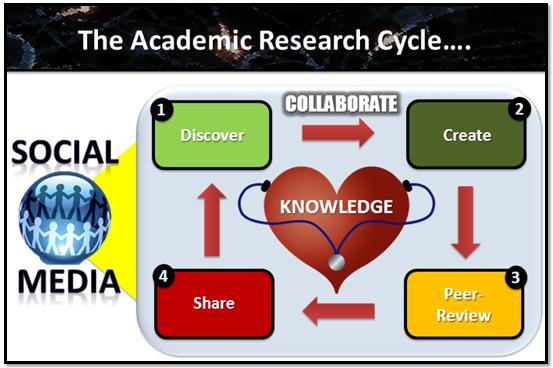
Using Social Media for Research will be presented on the 2nd September (Insya-Allah) at the APAME Convention 2012.

ABSTRACT
PRESENTATION SLIDES
PONDERING!
So, how are you going to inspire your main idea to the audience?

Tuesday, February 17, 2015
C Program to Compare Two Strings Using Pointers
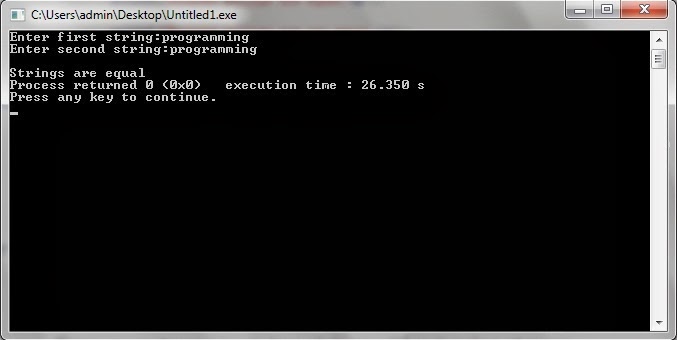
In below program we are comparing two string with the help of pointers, without using strcmp() function. A user defined function str_cmp() is created which takes two character pointers as argument. If this function returns 1 than the strings are equal and unequal if returns 0. Just take a look on the program, if you are facing any problem to understand then feel free to ask by commenting below.
Also Read: C++ Program to reverse a string
Also Read: C++ Program to Count no. of words in a string
#include<iostream>
#include<stdio.h>
using namespace std;
main()
{
char str1[50],str2[50];
int str_cmp(char*,char*);
cout<<"Enter first string:";
gets(str1);
cout<<"Enter second string:";
gets(str2);
if(str_cmp(str1,str2))
cout<<"
Strings are equal";
else
cout<<"
Strings are not equal";
return 0;
}
int str_cmp(char *s1,char *s2)
{
while(*s1==*s2)
{
if(*s1==
Thursday, February 5, 2015
Creating a Pentomino game using AS3 Part 3
By saying "first" I mean that only one type of shape is going to be available, and all it is going to do is follow the mouse and scale itself to have cell sizes of the ones in the grid.
Start by creating a new movie clip in your Flash project. Draw a 5x1vertical tiled shape inside of it, make sure each cells dimensions are exactly 100x100 pixels and the center of the movieclip is exactly in the center of the middle square:
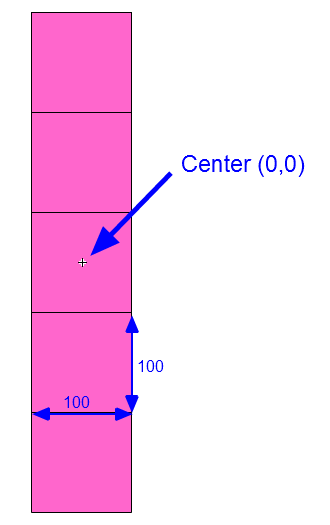
Later on, well be able to add more shapes to this movieclip in other frames. One frame holds one shape, basically. The reason were doing this like that is because this way it is very easy to use nicely drawn game assets instead of simple squares drawn by Flash API. The example above is simply a placeholder.
Now, give this movie clip a class name of "game_shape". Then remove this movie clip from the scene, keeping it only in the library.
Go to pentomino_game.as file. Declare a new "cursor" MovieClip:
private var cursor:MovieClip;
In the constructor, set this cursor to a new game_shape instance and add it to the stage. Disable its mouseEnabled, mouseChildren and visible properties, add a MOUSE_MOVE event listener.
// cursor
cursor = new game_shape();
addChild(cursor);
cursor.mouseEnabled = false;
cursor.mouseChildren = false;
cursor.visible = false;
addEventListener(MouseEvent.MOUSE_MOVE, mouseMove);
Then we also call startDragShape(1). This is temporary line, were only leaving it in the constructor for now:
// temporary shape
startDragShape(1);
The mouseMove() function simply makes the cursor follow the mouse:
private function mouseMove(evt:MouseEvent):void {
cursor.x = mouseX;
cursor.y = mouseY;
}
Now create the startDragShape() function. The "1" that we passed in the parameter is a variable called shapeType, it represents the frame in game_shape MovieClip that holds the wanted graphic.
Because we set the width and height of each single cell in the shape to 100 pixels, we can now easily find the scale multiplier to properly size the shape. Update the cursors size, alpha, visibility and make it go to the shapeType frame.
private function startDragShape(shapeType:int):void {
cursor.scaleX = gridCellWidth / 100;
cursor.scaleY = gridCellWidth / 100;
cursor.alpha = 0.75;
cursor.visible = true;
cursor.gotoAndStop(shapeType);
}
Full code:
package
{
import flash.display.MovieClip;
import flash.display.Sprite;
import flash.events.MouseEvent;

/**
 * Open-source pentomino game engine
 * @author Kirill Poletaev
 */

public class pentomino_game extends MovieClip
{
private var mapGrid:Array = [];

private var gridShape:Sprite = new Sprite();
private var gridStartX:int;
private var gridStartY:int;
private var gridCellWidth:int;

private var cursor:MovieClip;

public function pentomino_game()
{
// default map
mapGrid = [
[1, 1, 1, 1, 1, 1, 1, 1, 1, 1],
[1, 1, 1, 1, 1, 1, 1, 1, 1, 1],
[1, 1, 1, 1, 0, 0, 1, 1, 1, 1],
[1, 1, 1, 1, 0, 0, 1, 1, 1, 1],
[1, 1, 1, 1, 1, 1, 1, 1, 1, 1],
[1, 1, 1, 1, 1, 1, 1, 1, 1, 1]
];

// grid settings
calculateGrid();
addChild(gridShape);
gridShape.x = gridStartX;
gridShape.y = gridStartY;

// draw tiles
drawGrid();

// cursor
cursor = new game_shape();
addChild(cursor);
cursor.mouseEnabled = false;
cursor.mouseChildren = false;
cursor.visible = false;
addEventListener(MouseEvent.MOUSE_MOVE, mouseMove);

// temporary shape
startDragShape(1);
}

private function calculateGrid():void {
var columns:int = mapGrid[0].length;
var rows:int = mapGrid.length;

// free size: 520x460
// fit in: 510x450

// calculate width of a cell:
gridCellWidth = Math.round(510 / columns);

var width:int = columns * gridCellWidth;
var height:int = rows * gridCellWidth;

// calculate side margin
gridStartX = (520 - width) / 2;

if (height < 450) {
gridStartY = (450 - height) / 2;
}
if (height >= 450) {
gridCellWidth = Math.round(450 / rows);
height = rows * gridCellWidth;
width = columns * gridCellWidth;
gridStartY = (460 - height) / 2;
gridStartX = (520 - width) / 2;
}
}

private function drawGrid():void {
gridShape.graphics.clear();
var width:int = mapGrid[0].length;
var height:int = mapGrid.length;

var i:int;
var u:int;

// draw background
for (i = 0; i < height; i++) {
for (u = 0; u < width; u++) {
if (mapGrid[i][u] == 1) drawCell(u, i, 0xffffff, 1, 0x999999);
}
}
}

private function drawCell(width:int, height:int, fill:uint, thick:Number, line:uint):void {
gridShape.graphics.beginFill(fill);
gridShape.graphics.lineStyle(thick, line);
gridShape.graphics.drawRect(width * gridCellWidth, height * gridCellWidth, gridCellWidth, gridCellWidth);
}

private function mouseMove(evt:MouseEvent):void {
cursor.x = mouseX;
cursor.y = mouseY;
}

private function startDragShape(shapeType:int):void {
cursor.scaleX = gridCellWidth / 100;
cursor.scaleY = gridCellWidth / 100;
cursor.alpha = 0.75;
cursor.visible = true;
cursor.gotoAndStop(shapeType);
}

}

}
Thanks for reading!
The results:
Monday, February 2, 2015
Creating a Pentomino game using AS3 Part 44
We first need to go to level_item.as and fix some fundamental problems with selecting a level there.
Move the line that adds Click event listener for the button to constructor, and use theGrid and theShapes values instead of mapGrid and shapes.
public function level_item()
{
btn.addEventListener(MouseEvent.CLICK, function() { (root as MovieClip).playLevel(theGrid, theShapes); } );
}
Declare these variables:
private var theGrid:Array;
private var theShapes:Array;
And set their values in setLevel():
public function setLevel(mapGrid:Array, shapes:Array, title:String):void {
tTitle.text = title;
levelPreview.mouseEnabled = false;
drawPreview(levelPreview, mapGrid);
theGrid = mapGrid;
theShapes = shapes;
}
Full level_item.as code:
package
{
import flash.display.MovieClip;
import flash.events.MouseEvent;

/**
 * Open-source pentomino game engine
 * @author Kirill Poletaev
 */

public class level_item extends MovieClip
{
private var theGrid:Array;
private var theShapes:Array;

public function level_item()
{
btn.addEventListener(MouseEvent.CLICK, function() { (root as MovieClip).playLevel(theGrid, theShapes); } );
}

public function setLevel(mapGrid:Array, shapes:Array, title:String):void {
tTitle.text = title;
levelPreview.mouseEnabled = false;
drawPreview(levelPreview, mapGrid);
theGrid = mapGrid;
theShapes = shapes;
}

private function drawPreview(levelPreview:MovieClip, mapGrid:Array):void {
var columns:int = mapGrid[0].length;
var rows:int = mapGrid.length;
var frameWidth:int = levelPreview.width;
var frameHeight:int = levelPreview.height;
var padding:int = 5;
var fitWidth:int = levelPreview.width - (padding * 2);
var fitHeight:int = levelPreview.height - (padding * 2);
var gridStartX:int;
var gridStartY:int;

// calculate width of a cell:
var gridCellWidth:int = Math.round(fitWidth / columns);

var width:int = columns * gridCellWidth;
var height:int = rows * gridCellWidth;

// calculate side margin
gridStartX = (frameWidth - width) / 2;

if (height < fitHeight) {
gridStartY = (fitHeight - height) / 2;
}
if (height >= fitHeight) {
gridCellWidth = Math.round(fitHeight / rows);
height = rows * gridCellWidth;
width = columns * gridCellWidth;
gridStartY = (frameHeight - height) / 2;
gridStartX = (frameWidth - width) / 2;
}

// draw map
levelPreview.x = gridStartX;
levelPreview.y = gridStartY;
levelPreview.graphics.clear();
var i:int;
var u:int;

for (i = 0; i < rows; i++) {
for (u = 0; u < columns; u++) {
if (mapGrid[i][u] == 1) drawCell(u, i, 0xffffff, 1, 0x999999, gridCellWidth, levelPreview);
}
}
}

private function drawCell(width:int, height:int, fill:uint, thick:Number, line:uint, gridCellWidth:int, gridShape:MovieClip):void {
gridShape.graphics.beginFill(fill);
gridShape.graphics.lineStyle(thick, line);
gridShape.graphics.drawRect(width * gridCellWidth, height * gridCellWidth, gridCellWidth, gridCellWidth);
}
}

}
Go to level_select.as and add a new variable levelWidth. We will use it store the value of a level thumbnails width:
private var levelWidth:int;
We set that value in the constructor, and immediately used it a few lines below - when setting levelHolders x value.
Also, add CLICK event handlers for btn_next and btn_prev buttons in the constructor. Add a line that calls updatePage():
public function level_select()
{
(root as MovieClip).stop();
btn_back.addEventListener(MouseEvent.CLICK, doBack);

levelHolder = new MovieClip();
for (var i:int = 0; i < 5; i++) {
var level:MovieClip = new level_item();
levelHolder.addChild(level);
levelItems.push(level);
level.x = (level.width + distance) * i;
levelWidth = level.width;
}
addChild(levelHolder);
levelHolder.y = 120;
levelHolder.x = -(levelWidth + distance) * 2 + levelWidth / 2;
goX = levelHolder.x;
selectLevel();
setChildIndex(btn_next, numChildren - 1);
setChildIndex(btn_prev, numChildren - 1);
addEventListener(Event.ENTER_FRAME, onFrame);
btn_next.addEventListener(MouseEvent.CLICK, goNext);
btn_prev.addEventListener(MouseEvent.CLICK, goPrev);
updatePage();
}
The goNext() and goPrev() functions increase or decrease currentLevel value by one, call selectLevel and then reposition levelHolder on the x axis. Call updatePage().
private function goNext(evt:MouseEvent):void {
currentLevel++;
selectLevel();
levelHolder.x = -(levelWidth + distance) * 1 + levelWidth / 2;
updatePage();
}

private function goPrev(evt:MouseEvent):void {
currentLevel--;
selectLevel();
levelHolder.x = -(levelWidth + distance) * 3 + levelWidth / 2;
updatePage();
}
The updatePage() function updates the displayed page value. This is displayed using a dynamic text field in the MovieClip - so open Flash and add a text field with id "tPage" somewhere on the screen on the sixth frame inside level_select MC. Heres the function that updates the value:
private function updatePage():void {
tPage.text = (currentLevel + 1) + "/" + levels.length;
}
Full level_select.as code so far:
package
{
import flash.display.MovieClip;
import flash.events.Event;
import flash.events.MouseEvent;

/**
 * Open-source pentomino game engine
 * @author Kirill Poletaev
 */

public class level_select extends MovieClip
{

private var levels:Array = [
{grid:
[
[1, 1, 1, 1, 1, 1, 1, 1, 1, 1],
[1, 1, 1, 1, 1, 1, 1, 1, 1, 1],
[1, 1, 1, 1, 1, 1, 1, 1, 1, 1],
[1, 1, 1, 1, 1, 1, 1, 1, 1, 1],
[1, 1, 1, 1, 1, 1, 1, 1, 1, 1],
[1, 1, 1, 1, 1, 1, 1, 1, 1, 1]
],
shapes:
[2, 2, 2, 2, 2, 2, 2, 2, 2, 2, 2, 2],
title:
"Standard 10x6"
},
{grid:
[
[1, 1, 1, 1, 1, 1, 1, 1, 1, 1],
[1, 1, 1, 1, 1, 1, 1, 1, 1, 1],
[1, 1, 1, 1, 1, 1, 1, 1, 1, 1],
[1, 1, 1, 1, 1, 1, 1, 1, 1, 1],
[1, 1, 1, 1, 1, 1, 1, 1, 1, 1],
[1, 1, 1, 1, 1, 1, 1, 1, 1, 1]
],
shapes:
[2, 2, 2, 2, 2, 2, 2, 2, 2, 2, 2, 2],
title:
"Standard 2"
},
{grid:
[
[1, 1, 1, 1, 1, 1, 1, 1, 1, 1],
[1, 1, 1, 1, 1, 1, 1, 1, 1, 1],
[1, 1, 1, 1, 1, 1, 1, 1, 1, 1],
[1, 1, 1, 1, 1, 1, 1, 1, 1, 1],
[1, 1, 1, 1, 1, 1, 1, 1, 1, 1],
[1, 1, 1, 1, 1, 1, 1, 1, 1, 1]
],
shapes:
[2, 2, 2, 2, 2, 2, 2, 2, 2, 2, 2, 2],
title:
"Standard 3"
},
{grid:
[
[1, 1, 1, 1, 1, 1, 1, 1, 1, 1],
[1, 1, 1, 1, 1, 1, 1, 1, 1, 1],
[1, 1, 1, 1, 1, 1, 1, 1, 1, 1],
[1, 1, 1, 1, 1, 1, 1, 1, 1, 1],
[1, 1, 1, 1, 1, 1, 1, 1, 1, 1],
[1, 1, 1, 1, 1, 1, 1, 1, 1, 1]
],
shapes:
[2, 2, 2, 2, 2, 2, 2, 2, 2, 2, 2, 2],
title:
"Standard 4"
},
{grid:
[
[1, 1, 1, 1, 1, 1, 1, 1, 1, 1],
[1, 1, 1, 1, 1, 1, 1, 1, 1, 1],
[1, 1, 1, 1, 1, 1, 1, 1, 1, 1],
[1, 1, 1, 1, 1, 1, 1, 1, 1, 1],
[1, 1, 1, 1, 1, 1, 1, 1, 1, 1],
[1, 1, 1, 1, 1, 1, 1, 1, 1, 1]
],
shapes:
[2, 2, 2, 2, 2, 2, 2, 2, 2, 2, 2, 2],
title:
"Standard 5"
}
];

private var currentLevel:int = 0;
private var distance:int = 100;
private var levelHolder:MovieClip;
private var levelItems:Array = [];
private var goX:int;
private var levelWidth:int;

public function level_select()
{
(root as MovieClip).stop();
btn_back.addEventListener(MouseEvent.CLICK, doBack);

levelHolder = new MovieClip();
for (var i:int = 0; i < 5; i++) {
var level:MovieClip = new level_item();
levelHolder.addChild(level);
levelItems.push(level);
level.x = (level.width + distance) * i;
levelWidth = level.width;
}
addChild(levelHolder);
levelHolder.y = 120;
levelHolder.x = -(levelWidth + distance) * 2 + levelWidth / 2;
goX = levelHolder.x;
selectLevel();
setChildIndex(btn_next, numChildren - 1);
setChildIndex(btn_prev, numChildren - 1);
addEventListener(Event.ENTER_FRAME, onFrame);
btn_next.addEventListener(MouseEvent.CLICK, goNext);
btn_prev.addEventListener(MouseEvent.CLICK, goPrev);
updatePage();
}

private function updatePage():void {
tPage.text = (currentLevel + 1) + "/" + levels.length;
}

private function goNext(evt:MouseEvent):void {
currentLevel++;
selectLevel();
levelHolder.x = -(levelWidth + distance) * 1 + levelWidth / 2;
updatePage();
}

private function goPrev(evt:MouseEvent):void {
currentLevel--;
selectLevel();
levelHolder.x = -(levelWidth + distance) * 3 + levelWidth / 2;
updatePage();
}

private function selectLevel():void {
setLevelPreview(0, currentLevel - 2);
setLevelPreview(1, currentLevel - 1);
setLevelPreview(2, currentLevel);
setLevelPreview(3, currentLevel + 1);
setLevelPreview(4, currentLevel + 2);

if (currentLevel < levels.length - 1) {
btn_next.alpha = 1;
btn_next.mouseEnabled = true;
}else {
btn_next.alpha = 0;
btn_next.mouseEnabled = false;
}

if (currentLevel > 0) {
btn_prev.alpha = 1;
btn_prev.mouseEnabled = true;
}else {
btn_prev.alpha = 0;
btn_prev.mouseEnabled = false;
}
}

private function setLevelPreview(ind:int, num:int):void {
if (num >= 0 && num < levels.length) {
levelItems[ind].alpha = 1;
levelItems[ind].mouseChildren = true;
levelItems[ind].setLevel(levels[num].grid, levels[num].shapes, levels[num].title);
}else {
levelItems[ind].alpha = 0;
levelItems[ind].mouseChildren = false;
}
}

private function onFrame(evt:Event):void {
levelHolder.x += Math.round((goX - levelHolder.x) / 5);
}

private function doBack(evt:MouseEvent):void {
(root as MovieClip).gotoAndStop(1);
}
}

}
Thanks for reading!
The results:
Creating a Pentomino game using AS3 Part 10
Well start by modifying the startDragShape() function. Add 3 new function parameters - rot, scalex, scaley, set their default values to 0. Apply the rot value to cursors rotation property, scalex to scaleX and scaley to scaleY. Then check if scalex is 0 (the value was not changed) and set scaleX and scaleY to gridCellWidth / 100:
private function startDragShape(shapeType:int, rot:int = 0, scalex:Number = 0, scaley:Number = 0):void {
cursor.rotation = rot;
cursor.scaleX = scalex;
cursor.scaleY = scaley;
if (scalex == 0) {
cursor.scaleX = gridCellWidth / 100;
cursor.scaleY = gridCellWidth / 100;
}
cursor.alpha = 0.75;
cursor.visible = true;
cursor.gotoAndStop(shapeType);
}
Now go to mouseUp() function and add a line that adds a MOUSE_DOWN event listener to newShape, also push the newShape value to placedShapes array:
private function mouseUp(evt:MouseEvent):void {
stopDragShape();
if (selectedShape > 0) {
if (!canPutHere) {
availableShapes[selectedShape-1]++;
shapeButtons[selectedShape-1].count.text = availableShapes[selectedShape-1];
selectedShape = 0;
}
if (canPutHere) {
var mousePos:Point = new Point(Math.floor((mouseX - gridStartX) / gridCellWidth), Math.floor((mouseY - gridStartY) / gridCellWidth));
var newShape:MovieClip = new game_shape();
addChild(newShape);
newShape.x = gridStartX + (mousePos.x+1) * gridCellWidth - gridCellWidth / 2;
newShape.y = gridStartY + (mousePos.y + 1) * gridCellWidth - gridCellWidth / 2;
newShape.rotation = cursor.rotation;
newShape.scaleX = cursor.scaleX;
newShape.scaleY = cursor.scaleY;
newShape.gotoAndStop(selectedShape);
newShape.addEventListener(MouseEvent.MOUSE_DOWN, placedShapeDown);
placedShapes.push(newShape);
for (var i:int = 0; i < currentValues.length; i++) {
var cellX:int = currentValues[i][0] + mousePos.x;
var cellY:int = currentValues[i][1] + mousePos.y;
mapGrid[cellY][cellX] = 2;
}
cursor.parent.setChildIndex(cursor, cursor.parent.numChildren - 1);
selectedShape = 0;
}
}
}
Create the placeShapeDown() function. In the first line, we set the selectedShape value to the current frame of the placed shape:
selectedShape = evt.currentTarget.currentFrame;
After that we call startDragShape() function and pass values to all of the parameters as shown below:
// start dragging
startDragShape(evt.currentTarget.currentFrame, evt.currentTarget.rotation, evt.currentTarget.scaleX, evt.currentTarget.scaleY);
Then we need to call updateCurrentValues() to fill the currentValues array with relative cell coordinates of an already rotated and flipped shape. Calculate the position of the said shape on the grid, and using these values, loop through the 5 cells in mapGrid and set their values to 1.
// update grid values
updateCurrentValues();
var shapePos:Point = new Point(Math.floor((evt.currentTarget.x - gridStartX) / gridCellWidth), Math.floor((evt.currentTarget.y - gridStartY) / gridCellWidth));
for (var i:int = 0; i < 5; i++) {
mapGrid[shapePos.y + currentValues[i][1]][shapePos.x + currentValues[i][0]] = 1;
}
Next we simply remove the listener and the shape:
// remove shape
evt.currentTarget.removeEventListener(MouseEvent.MOUSE_DOWN, placedShapeDown);
evt.currentTarget.parent.removeChild(evt.currentTarget);
And finally we call checkPut():
checkPut();
Full code so far:
package
{
import flash.display.MovieClip;
import flash.display.Sprite;
import flash.events.Event;
import flash.events.KeyboardEvent;
import flash.events.MouseEvent;
import flash.geom.Point;
import flash.utils.ByteArray;

/**
 * Open-source pentomino game engine
 * @author Kirill Poletaev
 */

public class pentomino_game extends MovieClip
{
private var mapGrid:Array = [];
private var availableShapes:Array = [];
private var shapeButtons:Array = [];
private var shapeValues:Array = [];
private var placedShapes:Array = [];

private var gridShape:Sprite = new Sprite();
private var canPutShape:Sprite = new Sprite();
private var gridStartX:int;
private var gridStartY:int;
private var gridCellWidth:int;

private var cursor:MovieClip;
private var rolledShape:MovieClip;
private var selectedShape:int = 0;
private var canPutHere:Boolean = false;
private var currentValues:Array = [];

public function pentomino_game()
{
// default map
mapGrid = [
[1, 1, 1, 1, 1, 1, 1, 1, 1, 1],
[1, 1, 1, 1, 1, 1, 1, 1, 1, 1],
[1, 1, 1, 1, 1, 1, 1, 1, 1, 1],
[1, 1, 1, 1, 1, 1, 1, 1, 1, 1],
[1, 1, 1, 1, 1, 1, 1, 1, 1, 1],
[1, 1, 1, 1, 1, 1, 1, 1, 1, 1]
];

availableShapes = [2, 2, 2, 2, 2, 2, 2, 2, 2, 2, 2, 2];

shapeValues = [
[[0, 0], [0, 1], [0, 2], [0, -1], [0, -2]],
[[0, 0], [0, -1], [0, 1], [1, 0], [1, -1]],
[[0, 0], [0, 1], [0, 2], [0, -1], [ -1, -1]],
[[0, 0], [0, 1], [0, -1], [ -1, 0], [1, -1]],
[[0, 0], [ -1, 0], [ -2, 0], [0, -1], [1, -1]],
[[0, 0], [0, 1], [0, -1], [1, -1], [ -1, -1]],
[[0, 0], [1, 0], [ -1, 0], [1, -1], [ -1, -1]],
[[0, 0], [ -1, 0], [ -2, 0], [0, -1], [0, -2]],
[[0, 0], [0, 1], [ -1, 1], [1, 0], [1, -1]],
[[0, 0], [0, 1], [0, -1], [1, 0], [ -1, 0]],
[[0, 0], [ -1, 0], [ -2, 0], [1, 0], [0, -1]],
[[0, 0], [0, 1], [1, 1], [0, -1], [-1, -1]]
];

// grid settings
calculateGrid();
addChild(gridShape);
gridShape.x = gridStartX;
gridShape.y = gridStartY;

// draw tiles
drawGrid();

// can put shape
addChild(canPutShape);
canPutShape.x = gridStartX;
canPutShape.y = gridStartY;

// add shape buttons
for (var i:int = 0; i < 4; i++) {
for (var u:int = 0; u < 3; u++) {
var shapeButton:MovieClip = new select_shape();
shapeButton.x = 528 + u * 62;
shapeButton.y = 55 + i * 62;
addChild(shapeButton);
shapeButton.bg.alpha = 0.3;
shapeButton.count.text = String(availableShapes[3 * i + u]);
shapeButton.shape.gotoAndStop(3 * i + u + 1);
shapeButtons.push(shapeButton);
shapeButton.addEventListener(MouseEvent.ROLL_OVER, buttonOver);
shapeButton.addEventListener(MouseEvent.ROLL_OUT, buttonOut);
shapeButton.addEventListener(MouseEvent.MOUSE_DOWN, buttonDown);
}
}

// cursor
cursor = new game_shape();
addChild(cursor);
cursor.mouseEnabled = false;
cursor.mouseChildren = false;
cursor.visible = false;
addEventListener(MouseEvent.MOUSE_MOVE, mouseMove);
addEventListener(MouseEvent.MOUSE_WHEEL, mouseWheel);
stage.addEventListener(KeyboardEvent.KEY_DOWN, keyDown);
addEventListener(Event.ENTER_FRAME, everyFrame);
addEventListener(MouseEvent.MOUSE_UP, mouseUp);
}

private function calculateGrid():void {
var columns:int = mapGrid[0].length;
var rows:int = mapGrid.length;

// free size: 520x460
// fit in: 510x450

// calculate width of a cell:
gridCellWidth = Math.round(510 / columns);

var width:int = columns * gridCellWidth;
var height:int = rows * gridCellWidth;

// calculate side margin
gridStartX = (520 - width) / 2;

if (height < 450) {
gridStartY = (450 - height) / 2;
}
if (height >= 450) {
gridCellWidth = Math.round(450 / rows);
height = rows * gridCellWidth;
width = columns * gridCellWidth;
gridStartY = (460 - height) / 2;
gridStartX = (520 - width) / 2;
}
}

private function drawGrid():void {
gridShape.graphics.clear();
var width:int = mapGrid[0].length;
var height:int = mapGrid.length;

var i:int;
var u:int;

// draw background
for (i = 0; i < height; i++) {
for (u = 0; u < width; u++) {
if (mapGrid[i][u] == 1) drawCell(u, i, 0xffffff, 1, 0x999999);
}
}
}

private function drawCell(width:int, height:int, fill:uint, thick:Number, line:uint):void {
gridShape.graphics.beginFill(fill);
gridShape.graphics.lineStyle(thick, line);
gridShape.graphics.drawRect(width * gridCellWidth, height * gridCellWidth, gridCellWidth, gridCellWidth);
}

private function mouseMove(evt:MouseEvent):void {
cursor.x = mouseX;
cursor.y = mouseY;
checkPut();
}

private function checkPut():void {
if (selectedShape > 0) {
var mousePos:Point = new Point(Math.floor((mouseX - gridStartX) / gridCellWidth), Math.floor((mouseY - gridStartY) / gridCellWidth));
canPutHere = true;
updateCurrentValues();
for (var i:int = 0; i < currentValues.length; i++) {
var cellX:int = currentValues[i][0] + mousePos.x;
var cellY:int = currentValues[i][1] + mousePos.y;
if (cellX < 0 || cellY < 0 || cellX >= mapGrid[0].length || cellY >= mapGrid.length || mapGrid[cellY][cellX]!=1) {
canPutHere = false;
}
}
if (canPutHere) {
cursor.alpha = 0.8;
}
if (!canPutHere) {
canPutShape.graphics.clear();
cursor.alpha = 0.4;
}
}
}

private function drawCanPut():void {
canPutShape.graphics.clear();
var mousePos:Point = new Point(Math.floor((mouseX - gridStartX) / gridCellWidth), Math.floor((mouseY - gridStartY) / gridCellWidth));
for (var i:int = 0; i < currentValues.length; i++) {
var cellX:int = (currentValues[i][0] + mousePos.x) * gridCellWidth;
var cellY:int = (currentValues[i][1] + mousePos.y) * gridCellWidth;
canPutShape.graphics.beginFill(0x00ff00, 0.2);
canPutShape.graphics.drawRect(cellX, cellY, gridCellWidth, gridCellWidth);
}
}

private function mouseWheel(evt:MouseEvent):void {
if (evt.delta > 0) cursor.rotation += 90;
if (evt.delta < 0) cursor.rotation -= 90;
if (selectedShape > 0) checkPut();
}

private function keyDown(evt:KeyboardEvent):void {
if (evt.keyCode == 68) cursor.rotation += 90;
if (evt.keyCode == 65) cursor.rotation -= 90;
if (evt.keyCode == 32) cursor.scaleX *= -1;
if (selectedShape > 0) checkPut();
}

private function updateCurrentValues():void {
currentValues = clone(shapeValues[selectedShape-1]);
for (var i:int = 0; i < 5; i++) {
if (cursor.rotation == 90) {
currentValues[i].reverse();
currentValues[i][0] *= -1;
}
if (cursor.rotation == 180 || cursor.rotation == -180) {
currentValues[i][0] *= -1;
currentValues[i][1] *= -1;
}
if (cursor.rotation == -90) {
currentValues[i].reverse();
currentValues[i][1] *= -1;
}
if (cursor.scaleX < 0 && (cursor.rotation != -90 || cursor.rotation != 90)) {
currentValues[i][0] *= -1;
}
if (cursor.scaleX < 0 && (cursor.rotation == -90 || cursor.rotation == 90)) {
currentValues[i][0] *= -1;
currentValues[i][1] *= -1;
}
}
drawCanPut();
}

private function clone(source:Object):*{
var myBA:ByteArray = new ByteArray();
myBA.writeObject(source);
myBA.position = 0;
return(myBA.readObject());
}

private function startDragShape(shapeType:int, rot:int = 0, scalex:Number = 0, scaley:Number = 0):void {
cursor.rotation = rot;
cursor.scaleX = scalex;
cursor.scaleY = scaley;
if (scalex == 0) {
cursor.scaleX = gridCellWidth / 100;
cursor.scaleY = gridCellWidth / 100;
}
cursor.alpha = 0.75;
cursor.visible = true;
cursor.gotoAndStop(shapeType);
}

private function stopDragShape():void {
canPutShape.graphics.clear();
cursor.alpha = 0;
cursor.visible = false;
}

private function everyFrame(evt:Event):void {
if (rolledShape != null) {
rolledShape.rotation += 4;
}
}

private function buttonOver(evt:MouseEvent):void {
if(selectedShape==0){
evt.currentTarget.bg.alpha = 1;
rolledShape = evt.target.shape;
}
}

private function buttonOut(evt:MouseEvent):void {
evt.currentTarget.bg.alpha = 0.3;
rolledShape = null;
}

private function buttonDown(evt:MouseEvent):void {
selectedShape = evt.currentTarget.shape.currentFrame;
if(availableShapes[selectedShape-1]>0){
startDragShape(selectedShape);
availableShapes[selectedShape-1]--;
evt.currentTarget.count.text = availableShapes[selectedShape-1];
evt.currentTarget.bg.alpha = 0.3;
rolledShape = null;
}else {
selectedShape = 0;
}
}

private function mouseUp(evt:MouseEvent):void {
stopDragShape();
if (selectedShape > 0) {
if (!canPutHere) {
availableShapes[selectedShape-1]++;
shapeButtons[selectedShape-1].count.text = availableShapes[selectedShape-1];
selectedShape = 0;
}
if (canPutHere) {
var mousePos:Point = new Point(Math.floor((mouseX - gridStartX) / gridCellWidth), Math.floor((mouseY - gridStartY) / gridCellWidth));
var newShape:MovieClip = new game_shape();
addChild(newShape);
newShape.x = gridStartX + (mousePos.x+1) * gridCellWidth - gridCellWidth / 2;
newShape.y = gridStartY + (mousePos.y + 1) * gridCellWidth - gridCellWidth / 2;
newShape.rotation = cursor.rotation;
newShape.scaleX = cursor.scaleX;
newShape.scaleY = cursor.scaleY;
newShape.gotoAndStop(selectedShape);
newShape.addEventListener(MouseEvent.MOUSE_DOWN, placedShapeDown);
placedShapes.push(newShape);
for (var i:int = 0; i < currentValues.length; i++) {
var cellX:int = currentValues[i][0] + mousePos.x;
var cellY:int = currentValues[i][1] + mousePos.y;
mapGrid[cellY][cellX] = 2;
}
cursor.parent.setChildIndex(cursor, cursor.parent.numChildren - 1);
selectedShape = 0;
}
}
}

private function placedShapeDown(evt:MouseEvent):void {
selectedShape = evt.currentTarget.currentFrame;

// start dragging
startDragShape(evt.currentTarget.currentFrame, evt.currentTarget.rotation, evt.currentTarget.scaleX, evt.currentTarget.scaleY);

// update grid values
updateCurrentValues();
var shapePos:Point = new Point(Math.floor((evt.currentTarget.x - gridStartX) / gridCellWidth), Math.floor((evt.currentTarget.y - gridStartY) / gridCellWidth));
for (var i:int = 0; i < 5; i++) {
mapGrid[shapePos.y + currentValues[i][1]][shapePos.x + currentValues[i][0]] = 1;
}

// remove shape
evt.currentTarget.removeEventListener(MouseEvent.MOUSE_DOWN, placedShapeDown);
evt.currentTarget.parent.removeChild(evt.currentTarget);

checkPut();
}
}

}
Thanks for reading!
Results:
Friday, January 30, 2015
Creating a Pentomino game using AS3 Part 39
Go to tryRemainingShapes() function and before the if..statement that calls hasSpace() function add another if..statement that checks if the cell with provided coordinates has value of 1. This is basically what we have in hasSpace() right now, but well be completely rewriting that function and checking for different things in it.
We need to label the while... loop by writing "outerLoop: " before the loop. This will allow us to break this loop from inside another loop. We break outerLoop if hasSpace() returns false.
Another change here is that we declare a new passedShapes Array that we can use to later remove the first element from and pass it to the next tryRemaininShapes() cycle. Simply passing a clone of innerTempShapes with .splice() does not work - it returns the element instead of the array.
private function tryRemainingShapes(tShapes:Array, tGrid:Array):void {
var innerTempShapes:Array = clone(tShapes);
var innerTempGrid:Array = clone(tGrid);
var e:int;
var t:int;
var passedShapes:Array;
// ...take each remaining shape...
outerLoop: while (innerTempShapes.length > 0) {
var currentShapeValues:Array = clone(shapeValues[innerTempShapes[0]]);
// ...try putting it in each cell...
for (e = 0; e < allCells.length; e++) {
// ...rotate the shape...
if (innerTempGrid[allCells[e].y][allCells[e].x] == 1) {
if (hasSpace(innerTempGrid, allCells[e].x, allCells[e].y)) {
for (t = 0; t < 8; t++) {
// ...check if it can be put...
if (canPut(currentShapeValues, allCells[e].x, allCells[e].y, innerTempGrid, t)) {
// ...on success, put this shape and try all remaining shapes...
putHere(currentShapeValues, allCells[e].x, allCells[e].y, innerTempGrid, t, innerTempShapes[0] + 2);
passedShapes = innerTempShapes.concat();
passedShapes.splice(0, 1);
tryRemainingShapes(passedShapes, innerTempGrid);
// ...if no empty cells remaining, then the puzzle is solved.
if (checkWin(innerTempGrid)) doWin(clone(innerTempGrid));
// ...step backwards...
removeHere(currentShapeValues, allCells[e].x, allCells[e].y, innerTempGrid, t);
}
}
}else {
break outerLoop;
}
}
}
// ...get rid of the shape and continue...
innerTempShapes.shift();
}
}
Go to onFrame() and add the hasSpace() check there as well:
private function onFrame(evt:Event):void {
// set temporary values
tempGrid = clone(givenGrid);
tempShapes = clone(givenShapes);
// perform a new cycle
var i:int;
var u:int;
var currentShapeValues:Array;
// Take the first shape in this cycle...
currentShapeValues = clone(shapeValues[tempShapes[cycleNum]]);
// ...remove current shape from shapes array (so that it isnt used twice)...
var shapeType:int = tempShapes[cycleNum] + 2;
tempShapes.splice(cycleNum, 1);
// ...try putting it in each available cell...
for (i = 0; i < allCells.length; i++) {
// ...try putting the shape in all 8 possible positions...
if(hasSpace(tempGrid, allCells[i].x, allCells[i].y)){
for (u = 0; u < 8; u++) {
// ...if successful, continue placing other cells...
if (canPut(currentShapeValues, allCells[i].x, allCells[i].y, tempGrid, u)) {
// ...first put the first shape on the grid...
putHere(currentShapeValues, allCells[i].x, allCells[i].y, tempGrid, u, shapeType);
// ...try all remaining shapes...
tryRemainingShapes(tempShapes, tempGrid);
removeHere(currentShapeValues, allCells[i].x, allCells[i].y, tempGrid, u);
}
}
}
}
// display info
tInfo.text = Solving level " + levelName + "
Attempts:  + attempts + "
Solutions: " + solutions.length;
// next cycle
nextCycle();
}
The hasSpace() function checks if the area on the grid that the cell is located in has more than 5 cells in it. Well call these cells neighbours. However, the cell itself counts as a neighbour too.
Declare a variable called "neighbours" and set its value to 1. Clone the grid data and set the current cells value in the grid to "n". All cells that are connected to this cell will have value "n".
Then add a line that adds returned value of getNeighbours() function to neighbours. Check if the number is greater than or equals 5, return true. Otherwise, return false.
private function hasSpace(mapGrid:Array, cX:int, cY:int):Boolean {
var neighbours:int = 1; // count self as neighbour
var nGrid:Array = clone(mapGrid);
nGrid[cY][cX] = "n"; // set to "n" if together
neighbours += getNeighbours(cX, cY, nGrid);
if (neighbours >= 5) return true;
return false;
}
The getNeighbours() function is a recursive function that loops through neighbours and checks their neighbours as well, and goes on before it meets a wall.
private function getNeighbours(cX:int, cY:int, grid:Array):int {
var n:int = 0;
if (cY != 0 && grid[cY - 1][cX] == 1) {
n++;
grid[cY - 1][cX] = "n";
n += getNeighbours(cX, cY - 1, grid);
}
if (cY != grid.length - 1 && grid[cY + 1][cX] == 1) {
n++;
grid[cY + 1][cX] = "n";
n += getNeighbours(cX, cY + 1, grid);
}
if (cX != 0 && grid[cY][cX - 1] == 1) {
n++;
grid[cY][cX - 1] = "n";
n += getNeighbours(cX - 1, cY, grid);
}
if (cX != grid[0].length - 1 && grid[cY][cX + 1] == 1) {
n++;
grid[cY][cX + 1] = "n";
n += getNeighbours(cX + 1, cY, grid);
}
return n;
}
Our solving algorithm is now more efficient (uses considerably less attempts => computes faster) and more accurate in finding solutions. Still, it is not fast enough to solve medium or bigger sized puzzles.
Full code so far:
package
{
import fl.controls.TextInput;
import flash.display.MovieClip;
import flash.display.Shape;
import flash.events.Event;
import flash.events.MouseEvent;
import flash.geom.Point;
import flash.net.SharedObject;
import flash.text.TextField;
import flash.utils.ByteArray;

/**
 * Open-source pentomino game engine
 * @author Kirill Poletaev
 */

public class level_solver extends MovieClip
{

private var allCells:Array;
private var tempGrid:Array;
private var tempShapes:Array;
private var givenGrid:Array;
private var givenShapes:Array;
private var cycleNum:int;
private var attempts:int;
private var solutions:Array;
private var levelName:String;
private var shapeValues:Array;
private var currentSol:int = 0;

public function level_solver()
{
}

public function solve(levelItem:Object):void {
drawPreview(levelPreview, levelItem.grid);
tInfo.text = Solving level " + levelItem.name + ";
var shapes:Array = levelItem.shapes;
var i:int
var u:int;
givenShapes = [];
for (i = 1; i <= 12; i++) {
this["tShape" + i].text = shapes[i - 1];
for (u = 0; u < shapes[i - 1]; u++) {
givenShapes.push(i - 1);
}
}
allCells = [];
for (i = 0; i < levelItem.grid.length; i++) {
for (u = 0; u < levelItem.grid.length; u++) {
if (levelItem.grid[i][u] == 1) {
allCells.push(new Point(u, i));
}
}
}
givenGrid = levelItem.grid;
tempGrid = [];
tempShapes = [];
solutions = [];
levelName = levelItem.name;
attempts = 0;
cycleNum = 0;
shapeValues = [
[[0, 0], [0, 1], [0, 2], [0, -1], [0, -2]],
[[0, 0], [0, -1], [0, 1], [1, 0], [1, -1]],
[[0, 0], [0, 1], [0, 2], [0, -1], [ -1, -1]],
[[0, 0], [0, 1], [0, -1], [ -1, 0], [1, -1]],
[[0, 0], [ -1, 0], [ -2, 0], [0, -1], [1, -1]],
[[0, 0], [0, 1], [0, -1], [1, -1], [ -1, -1]],
[[0, 0], [1, 0], [ -1, 0], [1, -1], [ -1, -1]],
[[0, 0], [ -1, 0], [ -2, 0], [0, -1], [0, -2]],
[[0, 0], [0, 1], [ -1, 1], [1, 0], [1, -1]],
[[0, 0], [0, 1], [0, -1], [1, 0], [ -1, 0]],
[[0, 0], [ -1, 0], [ -2, 0], [1, 0], [0, -1]],
[[0, 0], [0, 1], [1, 1], [0, -1], [-1, -1]]
];
addEventListener(Event.ENTER_FRAME, onFrame);
btn_prev.addEventListener(MouseEvent.CLICK, goPrev);
btn_next.addEventListener(MouseEvent.CLICK, goNext);
}

private function onFrame(evt:Event):void {
// set temporary values
tempGrid = clone(givenGrid);
tempShapes = clone(givenShapes);
// perform a new cycle
var i:int;
var u:int;
var currentShapeValues:Array;
// Take the first shape in this cycle...
currentShapeValues = clone(shapeValues[tempShapes[cycleNum]]);
// ...remove current shape from shapes array (so that it isnt used twice)...
var shapeType:int = tempShapes[cycleNum] + 2;
tempShapes.splice(cycleNum, 1);
// ...try putting it in each available cell...
for (i = 0; i < allCells.length; i++) {
// ...try putting the shape in all 8 possible positions...
if(hasSpace(tempGrid, allCells[i].x, allCells[i].y)){
for (u = 0; u < 8; u++) {
// ...if successful, continue placing other cells...
if (canPut(currentShapeValues, allCells[i].x, allCells[i].y, tempGrid, u)) {
// ...first put the first shape on the grid...
putHere(currentShapeValues, allCells[i].x, allCells[i].y, tempGrid, u, shapeType);
// ...try all remaining shapes...
tryRemainingShapes(tempShapes, tempGrid);
removeHere(currentShapeValues, allCells[i].x, allCells[i].y, tempGrid, u);
}
}
}
}
// display info
tInfo.text = Solving level " + levelName + "
Attempts:  + attempts + "
Solutions: " + solutions.length;
// next cycle
nextCycle();
}

private function tryRemainingShapes(tShapes:Array, tGrid:Array):void {
var innerTempShapes:Array = clone(tShapes);
var innerTempGrid:Array = clone(tGrid);
var e:int;
var t:int;
var passedShapes:Array;
// ...take each remaining shape...
outerLoop: while (innerTempShapes.length > 0) {
var currentShapeValues:Array = clone(shapeValues[innerTempShapes[0]]);
// ...try putting it in each cell...
for (e = 0; e < allCells.length; e++) {
// ...rotate the shape...
if (innerTempGrid[allCells[e].y][allCells[e].x] == 1) {
if (hasSpace(innerTempGrid, allCells[e].x, allCells[e].y)) {
for (t = 0; t < 8; t++) {
// ...check if it can be put...
if (canPut(currentShapeValues, allCells[e].x, allCells[e].y, innerTempGrid, t)) {
// ...on success, put this shape and try all remaining shapes...
putHere(currentShapeValues, allCells[e].x, allCells[e].y, innerTempGrid, t, innerTempShapes[0] + 2);
passedShapes = innerTempShapes.concat();
passedShapes.splice(0, 1);
tryRemainingShapes(passedShapes, innerTempGrid);
// ...if no empty cells remaining, then the puzzle is solved.
if (checkWin(innerTempGrid)) doWin(clone(innerTempGrid));
// ...step backwards...
removeHere(currentShapeValues, allCells[e].x, allCells[e].y, innerTempGrid, t);
}
}
}else {
break outerLoop;
}
}
}
// ...get rid of the shape and continue...
innerTempShapes.shift();
}
}

private function hasSpace(mapGrid:Array, cX:int, cY:int):Boolean {
var neighbours:int = 1; // count self as neighbour
var nGrid:Array = clone(mapGrid);
nGrid[cY][cX] = "n"; // set to "n" if together
neighbours += getNeighbours(cX, cY, nGrid);
if (neighbours >= 5) return true;
return false;
}

private function getNeighbours(cX:int, cY:int, grid:Array):int {
var n:int = 0;
if (cY != 0 && grid[cY - 1][cX] == 1) {
n++;
grid[cY - 1][cX] = "n";
n += getNeighbours(cX, cY - 1, grid);
}
if (cY != grid.length - 1 && grid[cY + 1][cX] == 1) {
n++;
grid[cY + 1][cX] = "n";
n += getNeighbours(cX, cY + 1, grid);
}
if (cX != 0 && grid[cY][cX - 1] == 1) {
n++;
grid[cY][cX - 1] = "n";
n += getNeighbours(cX - 1, cY, grid);
}
if (cX != grid[0].length - 1 && grid[cY][cX + 1] == 1) {
n++;
grid[cY][cX + 1] = "n";
n += getNeighbours(cX + 1, cY, grid);
}
return n;
}

private function checkWin(mapGrid:Array):Boolean {
var i:int;
var u:int;
var didWin:Boolean = true;
var width:int = mapGrid[0].length;
var height:int = mapGrid.length;

for (i = 0; i < height; i++) {
for (u = 0; u < width; u++) {
if (mapGrid[i][u] == 1) {didWin = false;}
}
}

return didWin;
}

private function doWin(grid:Array):void {
var exists:Boolean = false;
for (var i:int = 0; i < solutions.length; i++) {
if (compare(solutions[i], grid)) {
exists = true;
break;
}
}
if (!exists) solutions.push(grid);
}

private function compare(arr1:Array, arr2:Array):Boolean {
for (var i:int = 0; i < arr1.length; i++) {
for (var u:int = 0; u < arr1[i].length; u++){
if (arr1[i][u] != arr2[i][u]) {
return false;
break;
}
}
}
return true;
}

private function goPrev(evt:MouseEvent):void {
currentSol--;
updateCurrentInfo();
}

private function goNext(evt:MouseEvent):void {
currentSol++;
updateCurrentInfo();
}

private function updateCurrentInfo():void {
var sol:int = (solutions.length > 0)?(currentSol + 1):(0);
tSol.text = sol + "/" + solutions.length;
if (sol <= 1) {
btn_prev.alpha = 0.5;
btn_prev.mouseEnabled = false;
}else {
btn_prev.alpha = 1;
btn_prev.mouseEnabled = true;
}
if (sol == solutions.length) {
btn_next.alpha = 0.5;
btn_next.mouseEnabled = false;
}else {
btn_next.alpha = 1;
btn_next.mouseEnabled = true;
}
if (solutions.length > 0) drawPreview(levelPreview, solutions[currentSol]);
}

private function nextCycle():void {
cycleNum++;
updateCurrentInfo();
if (cycleNum == givenShapes.length) {
removeEventListener(Event.ENTER_FRAME, onFrame);
// display info
tInfo.text = Finished solving " + levelName + "
Attempts:  + attempts + "
Solutions: " + solutions.length;
}
}

private function canPut(cValues:Array, cellX:int, cellY:int, mapGrid:Array, rotation:int):Boolean {
attempts++;
var canPutHere:Boolean = true;
var currentValues:Array = clone(cValues);
updateCurrentValues(currentValues, rotation);
for (var i:int = 0; i < currentValues.length; i++) {
var cX:int = currentValues[i][0] + cellX;
var cY:int = currentValues[i][1] + cellY;
if (cX < 0 || cY < 0 || cX >= mapGrid[0].length || cY >= mapGrid.length || mapGrid[cY][cX]!=1) {
canPutHere = false;
}
}
return canPutHere;
}

private function putHere(currentValues:Array, cellX:int, cellY:int, mapGrid:Array, rotation:int, shape:int):void {
currentValues = clone(currentValues);
updateCurrentValues(currentValues, rotation);
for (var i:int = 0; i < currentValues.length; i++) {
var cX:int = currentValues[i][0] + cellX;
var cY:int = currentValues[i][1] + cellY;
mapGrid[cY][cX] = shape;
}
}

private function removeHere(currentValues:Array, cellX:int, cellY:int, mapGrid:Array, rotation:int):void {
currentValues = clone(currentValues);
updateCurrentValues(currentValues, rotation);
for (var i:int = 0; i < currentValues.length; i++) {
var cX:int = currentValues[i][0] + cellX;
var cY:int = currentValues[i][1] + cellY;
mapGrid[cY][cX] = 1;
}
}

private function updateCurrentValues(currentValues:Array, rot:int):void{
for (var i:int = 0; i < 5; i++) {
// do nothing if rot == 0
if (rot == 1) {
currentValues[i].reverse();
currentValues[i][0] *= -1;
}
if (rot == 2) {
currentValues[i][0] *= -1;
currentValues[i][1] *= -1;
}
if (rot == 3) {
currentValues[i].reverse();
currentValues[i][1] *= -1;
}
if (rot == 4) {
currentValues[i][0] *= -1;
}
if (rot == 5) {
currentValues[i].reverse();
}
if (rot == 6) {
currentValues[i][1] *= -1;
}
if (rot == 7) {
currentValues[i].reverse();
currentValues[i][1] *= -1;
currentValues[i][0] *= -1;
}
}
}

private function clone(source:Object):*{
var myBA:ByteArray = new ByteArray();
myBA.writeObject(source);
myBA.position = 0;
return(myBA.readObject());
}

private function drawPreview(levelPreview:MovieClip, mapGrid:Array):void {
var columns:int = mapGrid[0].length;
var rows:int = mapGrid.length;
var frameWidth:int = levelPreview.width;
var frameHeight:int = levelPreview.height;
var padding:int = 5;
var fitWidth:int = levelPreview.width - (padding * 2);
var fitHeight:int = levelPreview.height - (padding * 2);
var gridStartX:int;
var gridStartY:int;

// calculate width of a cell:
var gridCellWidth:int = Math.round(fitWidth / columns);

var width:int = columns * gridCellWidth;
var height:int = rows * gridCellWidth;

// calculate side margin
gridStartX = (frameWidth - width) / 2;

if (height < fitHeight) {
gridStartY = (fitHeight - height) / 2;
}
if (height >= fitHeight) {
gridCellWidth = Math.round(fitHeight / rows);
height = rows * gridCellWidth;
width = columns * gridCellWidth;
gridStartY = (frameHeight - height) / 2;
gridStartX = (frameWidth - width) / 2;
}

// draw map
levelPreview.shape.x = gridStartX;
levelPreview.shape.y = gridStartY;
levelPreview.shape.graphics.clear();
var i:int;
var u:int;

for (i = 0; i < rows; i++) {
for (u = 0; u < columns; u++) {
if (mapGrid[i][u] == 1) drawCell(u, i, 0xffffff, 1, 0x999999, gridCellWidth, levelPreview.shape);
if (mapGrid[i][u] == 2) drawCell(u, i, 0xff66cc, 1, 0x000000, gridCellWidth, levelPreview.shape);
if (mapGrid[i][u] == 3) drawCell(u, i, 0x00FF66, 1, 0x000000, gridCellWidth, levelPreview.shape);
if (mapGrid[i][u] == 4) drawCell(u, i, 0x99ff00, 1, 0x000000, gridCellWidth, levelPreview.shape);
if (mapGrid[i][u] == 5) drawCell(u, i, 0x00ccff, 1, 0x000000, gridCellWidth, levelPreview.shape);
if (mapGrid[i][u] == 6) drawCell(u, i, 0xffcc66, 1, 0x000000, gridCellWidth, levelPreview.shape);
if (mapGrid[i][u] == 7) drawCell(u, i, 0x66cc33, 1, 0x000000, gridCellWidth, levelPreview.shape);
if (mapGrid[i][u] == 8) drawCell(u, i, 0x9900ff, 1, 0x000000, gridCellWidth, levelPreview.shape);
if (mapGrid[i][u] == 9) drawCell(u, i, 0xff5858, 1, 0x000000, gridCellWidth, levelPreview.shape);
if (mapGrid[i][u] == 10) drawCell(u, i, 0xff6600, 1, 0x000000, gridCellWidth, levelPreview.shape);
if (mapGrid[i][u] == 11) drawCell(u, i, 0x00ffff, 1, 0x000000, gridCellWidth, levelPreview.shape);
if (mapGrid[i][u] == 12) drawCell(u, i, 0xff6b20, 1, 0x000000, gridCellWidth, levelPreview.shape);
if (mapGrid[i][u] == 13) drawCell(u, i, 0xffff66, 1, 0x000000, gridCellWidth, levelPreview.shape);
}
}
}

private function drawCell(width:int, height:int, fill:uint, thick:Number, line:uint, gridCellWidth:int, gridShape:MovieClip):void {
gridShape.graphics.beginFill(fill);
gridShape.graphics.lineStyle(thick, line);
gridShape.graphics.drawRect(width * gridCellWidth, height * gridCellWidth, gridCellWidth, gridCellWidth);
}
}

}
Thanks for reading!