Showing posts with label 44. Show all posts
Showing posts with label 44. Show all posts
Monday, February 2, 2015
Creating a Pentomino game using AS3 Part 44
Today we continue working on the level selection menu.
We first need to go to level_item.as and fix some fundamental problems with selecting a level there.
Move the line that adds Click event listener for the button to constructor, and use theGrid and theShapes values instead of mapGrid and shapes.
Declare these variables:
And set their values in setLevel():
Full level_item.as code:
Go to level_select.as and add a new variable levelWidth. We will use it store the value of a level thumbnails width:
We set that value in the constructor, and immediately used it a few lines below - when setting levelHolders x value.
Also, add CLICK event handlers for btn_next and btn_prev buttons in the constructor. Add a line that calls updatePage():
The goNext() and goPrev() functions increase or decrease currentLevel value by one, call selectLevel and then reposition levelHolder on the x axis. Call updatePage().
The updatePage() function updates the displayed page value. This is displayed using a dynamic text field in the MovieClip - so open Flash and add a text field with id "tPage" somewhere on the screen on the sixth frame inside level_select MC. Heres the function that updates the value:
Full level_select.as code so far:
Thanks for reading!
The results:
Read more »
We first need to go to level_item.as and fix some fundamental problems with selecting a level there.
Move the line that adds Click event listener for the button to constructor, and use theGrid and theShapes values instead of mapGrid and shapes.
public function level_item()
{
btn.addEventListener(MouseEvent.CLICK, function() { (root as MovieClip).playLevel(theGrid, theShapes); } );
}
Declare these variables:
private var theGrid:Array;
private var theShapes:Array;
And set their values in setLevel():
public function setLevel(mapGrid:Array, shapes:Array, title:String):void {
tTitle.text = title;
levelPreview.mouseEnabled = false;
drawPreview(levelPreview, mapGrid);
theGrid = mapGrid;
theShapes = shapes;
}
Full level_item.as code:
package
{
import flash.display.MovieClip;
import flash.events.MouseEvent;

/**
 * Open-source pentomino game engine
 * @author Kirill Poletaev
 */

public class level_item extends MovieClip
{
private var theGrid:Array;
private var theShapes:Array;

public function level_item()
{
btn.addEventListener(MouseEvent.CLICK, function() { (root as MovieClip).playLevel(theGrid, theShapes); } );
}

public function setLevel(mapGrid:Array, shapes:Array, title:String):void {
tTitle.text = title;
levelPreview.mouseEnabled = false;
drawPreview(levelPreview, mapGrid);
theGrid = mapGrid;
theShapes = shapes;
}

private function drawPreview(levelPreview:MovieClip, mapGrid:Array):void {
var columns:int = mapGrid[0].length;
var rows:int = mapGrid.length;
var frameWidth:int = levelPreview.width;
var frameHeight:int = levelPreview.height;
var padding:int = 5;
var fitWidth:int = levelPreview.width - (padding * 2);
var fitHeight:int = levelPreview.height - (padding * 2);
var gridStartX:int;
var gridStartY:int;

// calculate width of a cell:
var gridCellWidth:int = Math.round(fitWidth / columns);

var width:int = columns * gridCellWidth;
var height:int = rows * gridCellWidth;

// calculate side margin
gridStartX = (frameWidth - width) / 2;

if (height < fitHeight) {
gridStartY = (fitHeight - height) / 2;
}
if (height >= fitHeight) {
gridCellWidth = Math.round(fitHeight / rows);
height = rows * gridCellWidth;
width = columns * gridCellWidth;
gridStartY = (frameHeight - height) / 2;
gridStartX = (frameWidth - width) / 2;
}

// draw map
levelPreview.x = gridStartX;
levelPreview.y = gridStartY;
levelPreview.graphics.clear();
var i:int;
var u:int;

for (i = 0; i < rows; i++) {
for (u = 0; u < columns; u++) {
if (mapGrid[i][u] == 1) drawCell(u, i, 0xffffff, 1, 0x999999, gridCellWidth, levelPreview);
}
}
}

private function drawCell(width:int, height:int, fill:uint, thick:Number, line:uint, gridCellWidth:int, gridShape:MovieClip):void {
gridShape.graphics.beginFill(fill);
gridShape.graphics.lineStyle(thick, line);
gridShape.graphics.drawRect(width * gridCellWidth, height * gridCellWidth, gridCellWidth, gridCellWidth);
}
}

}
Go to level_select.as and add a new variable levelWidth. We will use it store the value of a level thumbnails width:
private var levelWidth:int;
We set that value in the constructor, and immediately used it a few lines below - when setting levelHolders x value.
Also, add CLICK event handlers for btn_next and btn_prev buttons in the constructor. Add a line that calls updatePage():
public function level_select()
{
(root as MovieClip).stop();
btn_back.addEventListener(MouseEvent.CLICK, doBack);

levelHolder = new MovieClip();
for (var i:int = 0; i < 5; i++) {
var level:MovieClip = new level_item();
levelHolder.addChild(level);
levelItems.push(level);
level.x = (level.width + distance) * i;
levelWidth = level.width;
}
addChild(levelHolder);
levelHolder.y = 120;
levelHolder.x = -(levelWidth + distance) * 2 + levelWidth / 2;
goX = levelHolder.x;
selectLevel();
setChildIndex(btn_next, numChildren - 1);
setChildIndex(btn_prev, numChildren - 1);
addEventListener(Event.ENTER_FRAME, onFrame);
btn_next.addEventListener(MouseEvent.CLICK, goNext);
btn_prev.addEventListener(MouseEvent.CLICK, goPrev);
updatePage();
}
The goNext() and goPrev() functions increase or decrease currentLevel value by one, call selectLevel and then reposition levelHolder on the x axis. Call updatePage().
private function goNext(evt:MouseEvent):void {
currentLevel++;
selectLevel();
levelHolder.x = -(levelWidth + distance) * 1 + levelWidth / 2;
updatePage();
}

private function goPrev(evt:MouseEvent):void {
currentLevel--;
selectLevel();
levelHolder.x = -(levelWidth + distance) * 3 + levelWidth / 2;
updatePage();
}
The updatePage() function updates the displayed page value. This is displayed using a dynamic text field in the MovieClip - so open Flash and add a text field with id "tPage" somewhere on the screen on the sixth frame inside level_select MC. Heres the function that updates the value:
private function updatePage():void {
tPage.text = (currentLevel + 1) + "/" + levels.length;
}
Full level_select.as code so far:
package
{
import flash.display.MovieClip;
import flash.events.Event;
import flash.events.MouseEvent;

/**
 * Open-source pentomino game engine
 * @author Kirill Poletaev
 */

public class level_select extends MovieClip
{

private var levels:Array = [
{grid:
[
[1, 1, 1, 1, 1, 1, 1, 1, 1, 1],
[1, 1, 1, 1, 1, 1, 1, 1, 1, 1],
[1, 1, 1, 1, 1, 1, 1, 1, 1, 1],
[1, 1, 1, 1, 1, 1, 1, 1, 1, 1],
[1, 1, 1, 1, 1, 1, 1, 1, 1, 1],
[1, 1, 1, 1, 1, 1, 1, 1, 1, 1]
],
shapes:
[2, 2, 2, 2, 2, 2, 2, 2, 2, 2, 2, 2],
title:
"Standard 10x6"
},
{grid:
[
[1, 1, 1, 1, 1, 1, 1, 1, 1, 1],
[1, 1, 1, 1, 1, 1, 1, 1, 1, 1],
[1, 1, 1, 1, 1, 1, 1, 1, 1, 1],
[1, 1, 1, 1, 1, 1, 1, 1, 1, 1],
[1, 1, 1, 1, 1, 1, 1, 1, 1, 1],
[1, 1, 1, 1, 1, 1, 1, 1, 1, 1]
],
shapes:
[2, 2, 2, 2, 2, 2, 2, 2, 2, 2, 2, 2],
title:
"Standard 2"
},
{grid:
[
[1, 1, 1, 1, 1, 1, 1, 1, 1, 1],
[1, 1, 1, 1, 1, 1, 1, 1, 1, 1],
[1, 1, 1, 1, 1, 1, 1, 1, 1, 1],
[1, 1, 1, 1, 1, 1, 1, 1, 1, 1],
[1, 1, 1, 1, 1, 1, 1, 1, 1, 1],
[1, 1, 1, 1, 1, 1, 1, 1, 1, 1]
],
shapes:
[2, 2, 2, 2, 2, 2, 2, 2, 2, 2, 2, 2],
title:
"Standard 3"
},
{grid:
[
[1, 1, 1, 1, 1, 1, 1, 1, 1, 1],
[1, 1, 1, 1, 1, 1, 1, 1, 1, 1],
[1, 1, 1, 1, 1, 1, 1, 1, 1, 1],
[1, 1, 1, 1, 1, 1, 1, 1, 1, 1],
[1, 1, 1, 1, 1, 1, 1, 1, 1, 1],
[1, 1, 1, 1, 1, 1, 1, 1, 1, 1]
],
shapes:
[2, 2, 2, 2, 2, 2, 2, 2, 2, 2, 2, 2],
title:
"Standard 4"
},
{grid:
[
[1, 1, 1, 1, 1, 1, 1, 1, 1, 1],
[1, 1, 1, 1, 1, 1, 1, 1, 1, 1],
[1, 1, 1, 1, 1, 1, 1, 1, 1, 1],
[1, 1, 1, 1, 1, 1, 1, 1, 1, 1],
[1, 1, 1, 1, 1, 1, 1, 1, 1, 1],
[1, 1, 1, 1, 1, 1, 1, 1, 1, 1]
],
shapes:
[2, 2, 2, 2, 2, 2, 2, 2, 2, 2, 2, 2],
title:
"Standard 5"
}
];

private var currentLevel:int = 0;
private var distance:int = 100;
private var levelHolder:MovieClip;
private var levelItems:Array = [];
private var goX:int;
private var levelWidth:int;

public function level_select()
{
(root as MovieClip).stop();
btn_back.addEventListener(MouseEvent.CLICK, doBack);

levelHolder = new MovieClip();
for (var i:int = 0; i < 5; i++) {
var level:MovieClip = new level_item();
levelHolder.addChild(level);
levelItems.push(level);
level.x = (level.width + distance) * i;
levelWidth = level.width;
}
addChild(levelHolder);
levelHolder.y = 120;
levelHolder.x = -(levelWidth + distance) * 2 + levelWidth / 2;
goX = levelHolder.x;
selectLevel();
setChildIndex(btn_next, numChildren - 1);
setChildIndex(btn_prev, numChildren - 1);
addEventListener(Event.ENTER_FRAME, onFrame);
btn_next.addEventListener(MouseEvent.CLICK, goNext);
btn_prev.addEventListener(MouseEvent.CLICK, goPrev);
updatePage();
}

private function updatePage():void {
tPage.text = (currentLevel + 1) + "/" + levels.length;
}

private function goNext(evt:MouseEvent):void {
currentLevel++;
selectLevel();
levelHolder.x = -(levelWidth + distance) * 1 + levelWidth / 2;
updatePage();
}

private function goPrev(evt:MouseEvent):void {
currentLevel--;
selectLevel();
levelHolder.x = -(levelWidth + distance) * 3 + levelWidth / 2;
updatePage();
}

private function selectLevel():void {
setLevelPreview(0, currentLevel - 2);
setLevelPreview(1, currentLevel - 1);
setLevelPreview(2, currentLevel);
setLevelPreview(3, currentLevel + 1);
setLevelPreview(4, currentLevel + 2);

if (currentLevel < levels.length - 1) {
btn_next.alpha = 1;
btn_next.mouseEnabled = true;
}else {
btn_next.alpha = 0;
btn_next.mouseEnabled = false;
}

if (currentLevel > 0) {
btn_prev.alpha = 1;
btn_prev.mouseEnabled = true;
}else {
btn_prev.alpha = 0;
btn_prev.mouseEnabled = false;
}
}

private function setLevelPreview(ind:int, num:int):void {
if (num >= 0 && num < levels.length) {
levelItems[ind].alpha = 1;
levelItems[ind].mouseChildren = true;
levelItems[ind].setLevel(levels[num].grid, levels[num].shapes, levels[num].title);
}else {
levelItems[ind].alpha = 0;
levelItems[ind].mouseChildren = false;
}
}

private function onFrame(evt:Event):void {
levelHolder.x += Math.round((goX - levelHolder.x) / 5);
}

private function doBack(evt:MouseEvent):void {
(root as MovieClip).gotoAndStop(1);
}
}

}
Thanks for reading!
The results:

Wednesday, January 28, 2015
Android beginner tutorial Part 44 ProgressDialog with spinner
In this tutorial well learn about ProgressDialogs with spinners.
A ProgressDialog is a Dialog that indicates a process - loading, downloading, etc. There are two ways of ProgressDialog appearances - one displays a spinner, the other one displays a progress bar. Today well learn about the first one.
Firstly we add a Button to our activity_main.xml layout:
In MainActivity.java class, the first thing we need to do is disable screen rotation. When the screen orientation changes, the Activity gets redrawn completely. All Dialogs that are open get closed too. However, all the Threads that are running dont stop. We are going to create a Thread when the button is clicked, which runs for 3 seconds and then closes the ProgressDialog. So, if the device is rotated and the screen changes orientation, the ProgressDialog gets closed but the Thread keeps running. When it stops, it will crash the application because it will try to close a ProgressDialog that doesnt exist.
There are a few way to prevent this, in this case I do it by just preventing screen rotation.
Then I add a click event listener to display the dialog and create a Thread that sleeps for 3000 milliseconds and closes the dialog. Create the dialog using ProgressDialog.show() method, provide it with context and 2 text messages. You can close the dialog using dismiss() method. Dont forget to start() the Thread you create:
Full code:
Results:
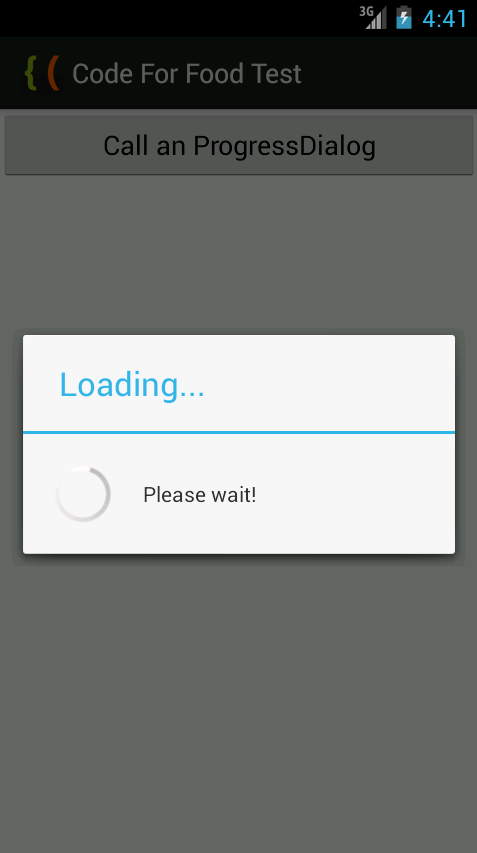
Thanks for reading!
Read more »
A ProgressDialog is a Dialog that indicates a process - loading, downloading, etc. There are two ways of ProgressDialog appearances - one displays a spinner, the other one displays a progress bar. Today well learn about the first one.
Firstly we add a Button to our activity_main.xml layout:
<LinearLayout xmlns:android="http://schemas.android.com/apk/res/android"
    xmlns:tools="http://schemas.android.com/tools"
    android:layout_width="match_parent"
    android:layout_height="match_parent"
    android:orientation="vertical"
    tools:context=".MainActivity" >

<Button
    android:id="@+id/testButton"
    android:layout_width="fill_parent"
    android:layout_height="wrap_content"
    android:text="Call an ProgressDialog"
    />

</LinearLayout>
In MainActivity.java class, the first thing we need to do is disable screen rotation. When the screen orientation changes, the Activity gets redrawn completely. All Dialogs that are open get closed too. However, all the Threads that are running dont stop. We are going to create a Thread when the button is clicked, which runs for 3 seconds and then closes the ProgressDialog. So, if the device is rotated and the screen changes orientation, the ProgressDialog gets closed but the Thread keeps running. When it stops, it will crash the application because it will try to close a ProgressDialog that doesnt exist.
There are a few way to prevent this, in this case I do it by just preventing screen rotation.
setRequestedOrientation(ActivityInfo.SCREEN_ORIENTATION_PORTRAIT);
Then I add a click event listener to display the dialog and create a Thread that sleeps for 3000 milliseconds and closes the dialog. Create the dialog using ProgressDialog.show() method, provide it with context and 2 text messages. You can close the dialog using dismiss() method. Dont forget to start() the Thread you create:
Button button = (Button)findViewById(R.id.testButton);

button.setOnClickListener(new View.OnClickListener() {

@Override
public void onClick(View v) {
final ProgressDialog myDialog = ProgressDialog.show(MainActivity.this, "Loading...", "Please wait!");
new Thread(new Runnable(){
@Override
public void run(){
try{
Thread.sleep(3000);
}catch(Exception e){}
myDialog.dismiss();
}
}).start();
}
});
Full code:
package com.kircode.codeforfood_test;

import android.app.Activity;
import android.app.ProgressDialog;
import android.content.pm.ActivityInfo;
import android.os.Bundle;
import android.view.Menu;
import android.view.View;
import android.widget.Button;

public class MainActivity extends Activity{

@Override
protected void onCreate(Bundle savedInstanceState) {
super.onCreate(savedInstanceState);
setRequestedOrientation(ActivityInfo.SCREEN_ORIENTATION_PORTRAIT);
setContentView(R.layout.activity_main);

Button button = (Button)findViewById(R.id.testButton);

button.setOnClickListener(new View.OnClickListener() {

@Override
public void onClick(View v) {
final ProgressDialog myDialog = ProgressDialog.show(MainActivity.this, "Loading...", "Please wait!");
new Thread(new Runnable(){
@Override
public void run(){
try{
Thread.sleep(3000);
}catch(Exception e){}
myDialog.dismiss();
}
}).start();
}
});
}

@Override
public boolean onCreateOptionsMenu(Menu menu) {
// Inflate the menu; this adds items to the action bar if it is present.
getMenuInflater().inflate(R.menu.activity_main, menu);
return true;
}

}
Results:
Thanks for reading!
Subscribe to:
Posts (Atom)